
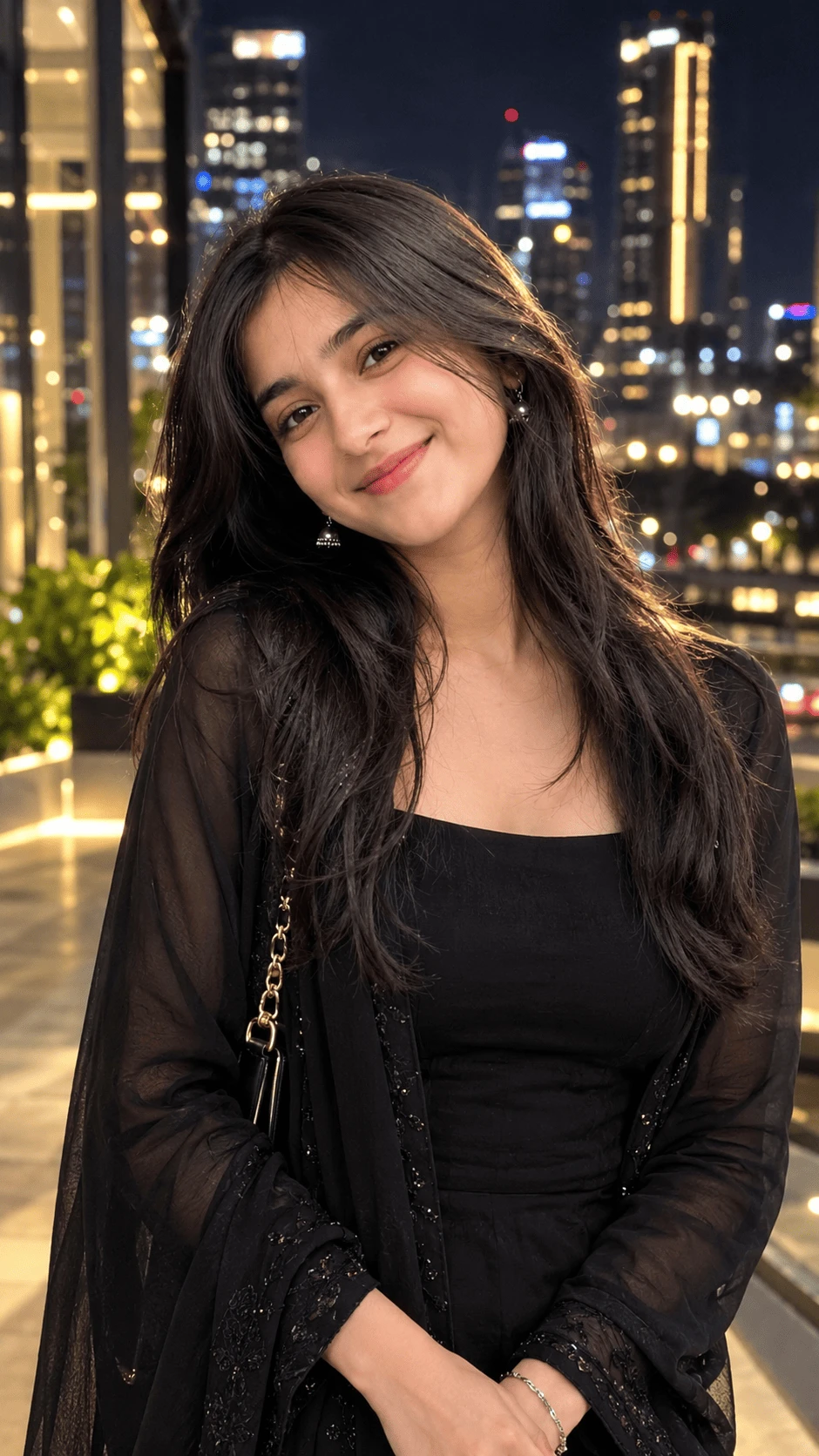
Black Outfit City Night Girl Portrait AI Photo Prompt
Create a stylish, elegant and ultra-realistic nighttime portrait using this AI photo prompt. The concept combines a sophisticated black outfit, modern city lights, cinematic bokeh and premium fashion photography.
About This AI Photo
This portrait features a young woman wearing an elegant black outfit while standing against a beautiful illuminated city background at night. The combination of dark clothing and warm urban lights creates a premium cinematic fashion aesthetic.
Subject and Pose
Keep the subject naturally positioned in the center of the frame. Her head is slightly tilted toward the camera while she gives a soft and confident smile. Her hands are naturally positioned in front of her body to create a relaxed and elegant pose.
Black Outfit Styling
The subject wears a fitted black top with a sheer black outer layer featuring subtle embroidered details. A stylish black shoulder bag with a gold chain strap adds an elegant fashion element to the composition.
Maintain realistic fabric texture, natural folds, embroidery details and physically believable clothing throughout the image.
Hair and Facial Details
Keep the woman's long dark hair natural, soft and detailed. Individual strands should be visible, especially around the face and shoulders.
When using a reference image, preserve the natural facial appearance and proportions. Avoid excessive skin smoothing, facial reshaping and artificial beauty filters. Realistic skin pores and subtle facial details help create a professional photography look.
Night City Background
Create a modern urban environment with tall buildings, illuminated windows, street lights and distant city lights. The background should remain slightly blurred to create depth while still clearly communicating a luxury city-night setting.
Cinematic Bokeh
Use a shallow depth of field to create beautiful circular bokeh from the distant lights. Warm golden and neutral city lights should appear softly behind the subject without distracting from her face.
Lighting
Use soft flattering light on the subject's face combined with warm ambient city lighting. Add subtle highlights around the hair and shoulders to separate the subject from the darker background.
Maintain realistic shadows, natural skin tones and balanced exposure. Avoid excessive brightness or artificial-looking lighting.
Photography Style
- Style: Ultra-realistic cinematic fashion photography
- Lighting: Soft front light with warm city ambience
- Background: Modern city skyline at night
- Depth of Field: Shallow cinematic depth of field
- Bokeh: Soft urban light bokeh
- Mood: Elegant, confident and sophisticated
- Quality: High-detail photorealistic
- Composition: Vertical portrait
- Aspect Ratio: 9:16
How to Get the Best Result
Use a clear, high-quality reference image when you want to preserve the subject's natural appearance. Give the AI clear instructions about the black outfit, city-night environment, lighting and pose.
For a premium result, ask for realistic skin texture, detailed hair strands, natural clothing folds and physically believable lighting. Keep the background slightly blurred so the subject remains the main focus.
Negative Prompt
Avoid plastic skin, excessive beauty filters, facial distortion, unrealistic eyes, unnatural expressions, distorted hands, extra fingers, missing fingers, duplicated limbs, bad anatomy, warped clothing, artificial hair, blurry face, cartoon effects, painting effects, unrealistic city backgrounds, excessive saturation, overexposure, watermark, text and AI artifacts.
Best Uses
- Instagram Posts
- Instagram Reels Covers
- Instagram Stories
- AI Portrait Editing
- Night Photography
- Fashion Portraits
- Luxury Lifestyle Content
- Mobile Wallpapers
Final Result
The final image should look like a professionally captured luxury nighttime fashion portrait. The elegant black outfit, natural expression, detailed hair and glowing city bokeh should work together to create a sophisticated cinematic atmosphere.
Copy the prompt, upload your reference image and use a 9:16 aspect ratio to create this stylish city-night portrait.
Comments