
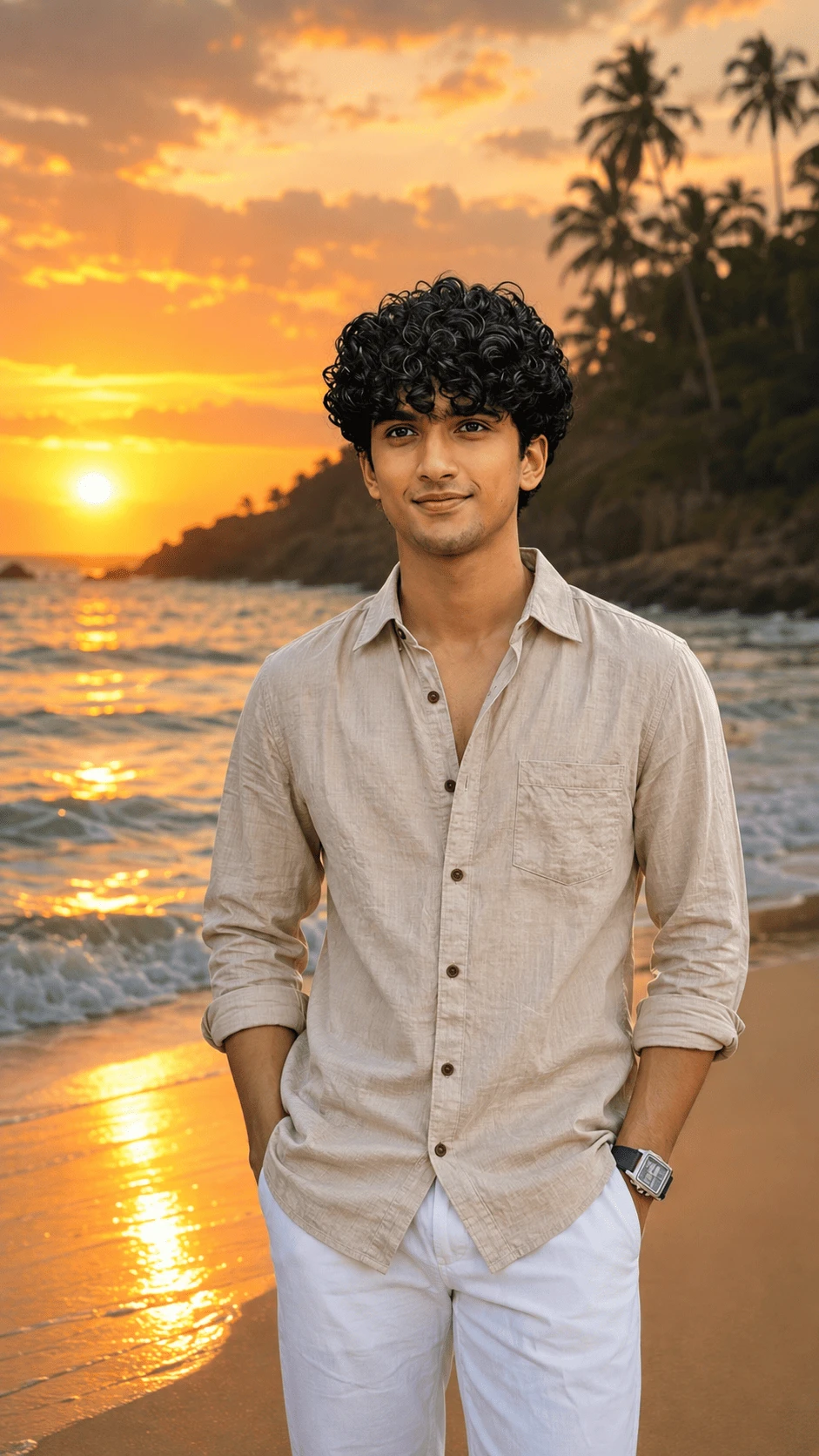
Create a stunning ultra-realistic golden sunset beach portrait with this detailed AI photo prompt. This concept combines a natural portrait, tropical beach scenery, warm sunset lighting, ocean waves and cinematic travel photography.
The prompt is designed for creators who want to transform a regular portrait into a premium-looking coastal photograph while maintaining natural facial details, realistic clothing textures, believable lighting and a professional photographic appearance.
About This AI Beach Portrait
This AI photo concept features a male subject standing on a beautiful beach during golden hour. The background includes a glowing sunset, calm ocean waves, wet sand and tropical palm trees, creating a warm and peaceful coastal environment.
The subject wears a light beige button-up shirt with naturally rolled sleeves and white trousers. The simple outfit complements the warm colors of the sunset and creates a clean luxury-travel aesthetic.
The final image is intended to look like a professionally captured travel portrait rather than an obviously generated AI image.
Golden Hour Sunset Background
Golden-hour lighting is one of the most important elements of this composition. The sun should be positioned close to the horizon, producing warm orange, yellow and golden tones across the sky.
Clouds should naturally reflect the sunset light without becoming excessively bright or artificial. The sky should have realistic gradients and atmospheric details.
A soft warm glow can illuminate the edges of the subject's hair and shoulders, creating a subtle cinematic rim-light effect while keeping the face properly exposed.
Ocean and Beach Environment
The ocean should appear natural and realistic, with gentle waves moving toward the shoreline. The sunlight should create realistic reflections across the water.
Wet sand near the water can reflect the warm sunset colors, adding depth and visual interest to the composition. Avoid overly perfect or artificial-looking waves.
The beach should feel peaceful and naturally photographed. Small variations in the sand, water movement and shoreline should help create a believable environment.
Tropical Palm Trees
Add tall tropical palm trees in the background to strengthen the coastal atmosphere. The palm trees should have realistic trunks, leaves and natural silhouettes.
Keep the palm trees slightly softer than the main subject so that the viewer's attention remains focused on the portrait. Natural depth of field can help separate the foreground subject from the distant tropical landscape.
Subject and Facial Preservation
When a reference image is provided, the AI should use it to preserve the subject's recognizable appearance. Facial structure, natural proportions, hairstyle, skin tone and expression should remain consistent.
Avoid excessive beauty enhancement or artificial skin smoothing. Natural skin texture should remain visible so that the final image looks like a genuine photograph.
The subject should have realistic eyes, facial proportions and natural lighting. The face should not appear overly retouched or digitally painted.
Clothing Details
The subject wears a light beige or off-white casual button-up shirt. The sleeves are naturally rolled up, giving the outfit a relaxed summer appearance.
The shirt should have realistic cotton or linen texture, visible fabric folds, natural wrinkles, buttons and stitching. The material should respond naturally to the warm sunset light.
White trousers complete the outfit and create a clean, minimal coastal fashion look. Keep the trousers realistic with natural folds and shadows.
Pose and Composition
Use a relaxed standing pose with natural body proportions. The subject should appear comfortable and confident while looking naturally toward the camera.
The composition should remain vertical and suitable for smartphone-focused platforms. Frame the subject prominently while leaving enough background space to show the sunset, ocean and tropical scenery.
A 9:16 aspect ratio is ideal for Instagram Stories, Reels covers, mobile wallpapers and other vertical social-media content.
Cinematic Photography Style
Use professional DSLR or mirrorless camera aesthetics. The image should have realistic depth of field, natural lens rendering, controlled highlights and detailed textures.
Use warm color tones created naturally by the sunset rather than applying an excessive color filter. Skin tones should remain realistic even when surrounded by warm environmental lighting.
Subtle atmospheric depth should separate the foreground subject from the distant ocean, palm trees and shoreline.
Recommended AI Settings
- Aspect Ratio: 9:16
- Orientation: Vertical
- Style: Ultra-realistic cinematic photography
- Lighting: Golden-hour sunset
- Mood: Peaceful, luxurious and adventurous
- Environment: Tropical beach and ocean
- Quality: High-detail photorealistic
- Camera Style: Professional DSLR/mirrorless photography
- Reference Image: Recommended
How to Create the Image
Start by uploading a clear reference portrait. A high-quality reference image can help the AI understand facial details, hairstyle, clothing and body proportions.
Copy the complete AI prompt and use it together with the reference image. The prompt instructs the AI to preserve the subject while changing or enhancing the surrounding environment into a cinematic tropical beach sunset.
For the best result, select a vertical 9:16 format. This keeps the composition suitable for Instagram Stories, Reels and mobile wallpapers.
How the Lighting Should Look
The sunset should provide the primary environmental light. Warm sunlight can illuminate the subject from behind or slightly from the side.
The face should remain clearly visible and naturally exposed. Avoid extreme backlighting that completely hides facial details.
A subtle golden rim light around the hair and shoulders can add depth and make the portrait look more professional.
Tips for Better AI Results
- Use a clear and sharp reference image.
- Keep the original facial proportions natural.
- Avoid excessive face beautification.
- Use realistic skin texture and natural skin tones.
- Keep the sunset warm but not overexposed.
- Make ocean waves physically believable.
- Use realistic reflections on wet sand and water.
- Keep palm trees natural and proportionate.
- Preserve realistic shirt fabric and folds.
- Check hands and fingers after generation.
- Use 9:16 for vertical social-media content.
- Avoid excessive saturation and artificial HDR.
Negative Prompt
Avoid face reshaping, face replacement, plastic skin, excessive beauty filters, unrealistic eyes, distorted facial features, unnatural skin tone, extra fingers, missing fingers, malformed hands, duplicated body parts, bad anatomy, unrealistic body proportions, blurry face, low resolution, artificial ocean, fake waves, distorted palm trees, warped clothing, excessive saturation, extreme HDR, cartoon effects, painting effects, unrealistic shadows, artificial lighting, watermark, unwanted text and AI artifacts.
Best Uses for This AI Photo
- Instagram Posts
- Instagram Stories
- Instagram Reels Covers
- Facebook Posts
- YouTube Community Posts
- Mobile Wallpapers
- Travel Photography Inspiration
- AI Portrait Editing
- Summer Fashion Content
- Beach-Themed Social Media Content
- Creative Photography Projects
SEO-Friendly Image Description
This ultra-realistic AI portrait features a man standing on a tropical beach during a beautiful golden sunset. The scene includes glowing ocean waves, warm sunlight, palm trees and a peaceful coastal landscape.
The light beige shirt and white trousers create a clean summer fashion look, while the warm sunset and ocean reflections provide a cinematic travel-photography atmosphere.
Why This Prompt Is Useful
A good AI image prompt should describe more than just the location. It should explain the subject, clothing, lighting, environment, composition, camera style and realistic details.
This prompt combines these elements to help create a cohesive photograph. The sunset lighting is described in relation to the subject so that the person and background appear to belong to the same environment.
The prompt also includes instructions for realistic skin, fabric, ocean reflections, atmospheric depth and natural proportions. These details can help reduce common AI image-generation problems.
Final Result
The desired final result is a premium-looking cinematic beach portrait captured during golden hour. The subject should appear natural and confident, with realistic facial details and authentic skin texture.
The tropical beach, ocean waves, glowing sunset and palm trees should blend naturally into the composition. Warm reflections on the water and sand should enhance the atmosphere without making the image look artificially edited.
Conclusion
The Golden Sunset Beach Portrait AI Photo Prompt is ideal for creators who want to generate realistic coastal portraits with a luxury travel aesthetic.
By combining natural facial preservation, realistic clothing, golden-hour lighting, ocean scenery and professional photography aesthetics, this prompt can help create visually engaging vertical portraits for social media and creative projects.
Copy the prompt, upload your reference image, select a 9:16 vertical format and generate your cinematic golden sunset beach portrait.


Comments