Korean Style Anime Boy Grey Sweater AI Photo Prompt
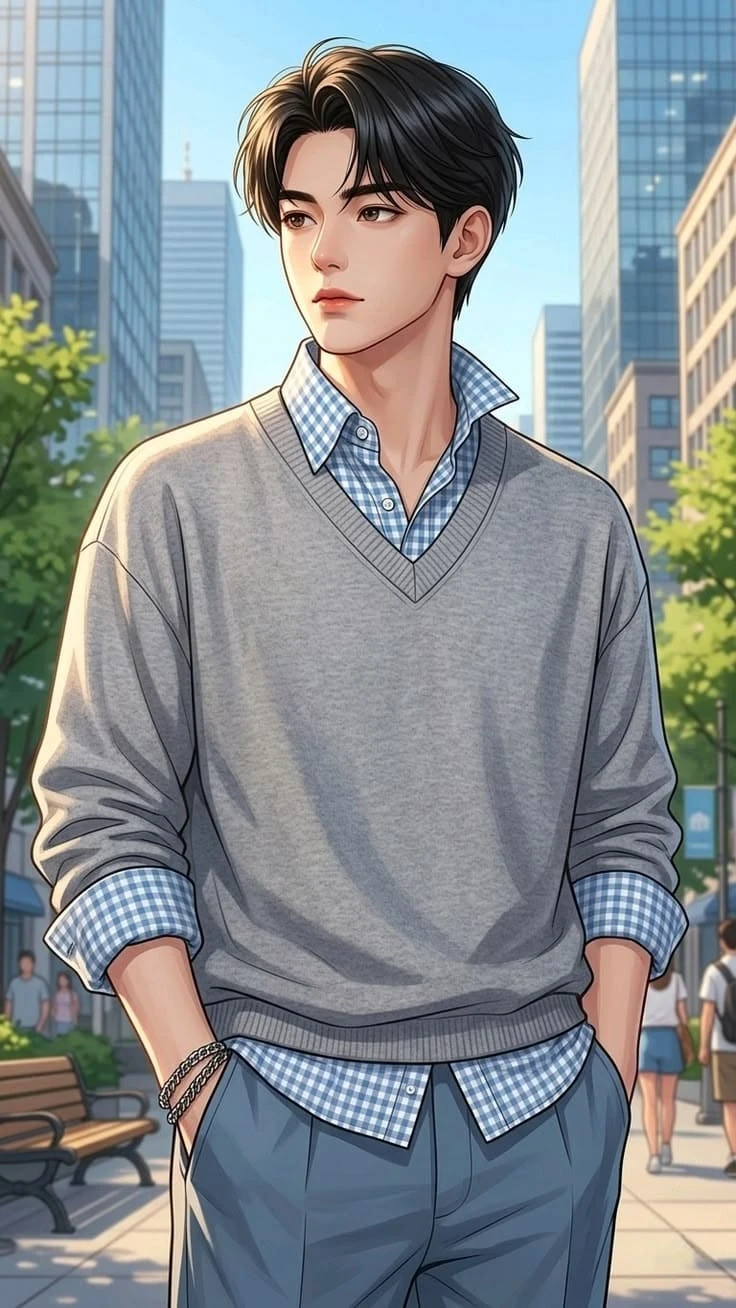
Create a stylish and polished anime portrait featuring a young male character wearing a light-grey V-neck sweater over a blue-and-white checkered shirt. The character stands casually on a modern city street surrounded by contemporary buildings, trees and soft natural daylight.
About This AI Photo
This AI artwork combines a clean modern anime character design with a fashionable urban outfit. The overall image has a bright, elegant and youthful appearance with detailed linework, smooth shading and a cinematic city background.
Character Appearance
The character should have a youthful anime face with expressive dark eyes, thick eyebrows, a clean jawline and a calm, thoughtful expression. His black hair should have a stylish center-parted appearance with natural volume and individually defined strands.
Outfit Details
The main outfit consists of a light-grey V-neck sweater layered over a blue-and-white checkered collared shirt. The shirt collar and cuffs should remain visible and clearly detailed.
Complete the outfit with relaxed blue-grey trousers and subtle silver bracelets. Keep the clothing folds natural and add detailed fabric textures to make the illustration look polished and premium.
Pose and Composition
The character should stand casually with both hands placed inside his trouser pockets. His shoulders should remain relaxed while his head is slightly turned to the side.
Use a vertical composition with the character as the primary focus. Keep the upper body and most of the lower body visible while maintaining a balanced amount of background space.
Urban Background
Place the character on a modern city sidewalk surrounded by tall glass buildings, trees, benches and a few distant pedestrians.
The background should remain detailed enough to establish a realistic urban environment while using soft depth of field to keep attention on the character.
Lighting
Use soft natural daytime lighting with gentle highlights on the character's hair, face and sweater. Add subtle shadows underneath the clothing and around the body to create depth.
Anime Rendering Style
Use clean anime linework, smooth professional shading, detailed hair strands and carefully rendered clothing folds. The final artwork should have a premium digital illustration appearance without looking blurry or overly simplified.
Recommended Settings
- Aspect Ratio: 9:16
- Style: Premium Anime Illustration
- Lighting: Soft Natural Daylight
- Mood: Calm, Stylish and Youthful
- Quality: High Detail
- Composition: Vertical Urban Portrait
- Background: Modern City Street
- Depth of Field: Soft Cinematic Background Blur
How to Get the Best Result
Use a clear reference image if you want the AI to follow a specific pose or composition. Describe the hairstyle, sweater, checkered shirt, trousers and urban environment clearly.
For a polished anime result, emphasize clean linework, natural proportions, detailed fabric folds and soft cinematic lighting.
Negative Prompt
Avoid distorted anatomy, extra fingers, missing fingers, malformed hands, extra limbs, uneven eyes, distorted facial features, oversized head, unrealistic body proportions, blurry character, messy linework, low-resolution rendering, excessive saturation, text, logo, watermark and unwanted AI artifacts.
Best Uses
- Instagram Reels Covers
- Instagram Stories
- Anime Profile Pictures
- Anime Wallpapers
- Social Media Posts
- Anime Character Posters
- AI Art Projects
- Creative Digital Artwork
Final Result
The final image should look like a premium modern anime illustration of a stylish young man wearing a grey sweater and blue checkered shirt in a bright urban setting. The character should remain the main focus while the city background provides depth and atmosphere.
Copy the prompt, use a clear reference image if required, select a 9:16 aspect ratio and generate a high-detail anime city portrait.
Comments