
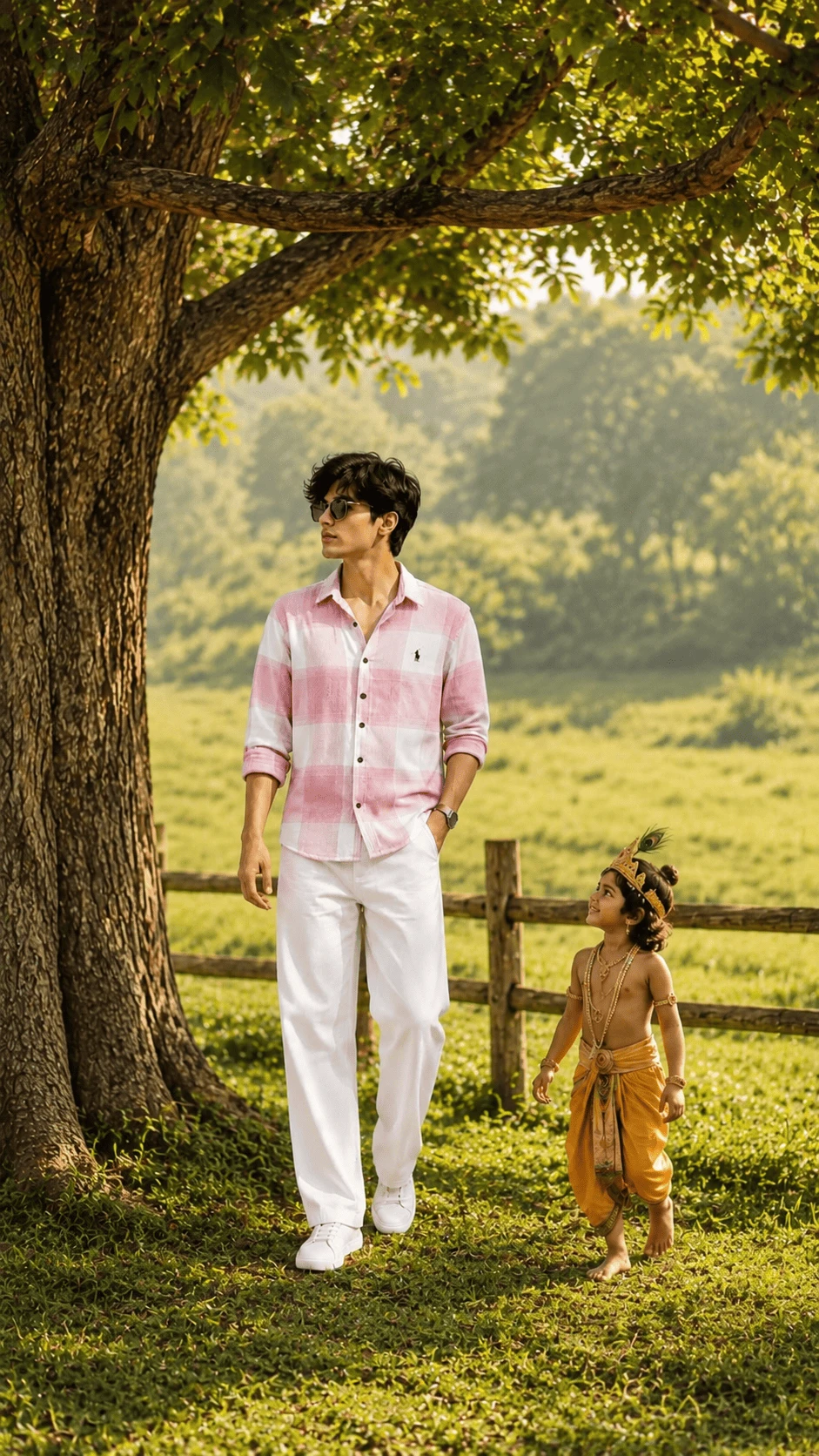
Create a beautiful, peaceful and cinematic AI-generated image featuring a modern young man walking through a lush green natural landscape alongside a childlike artistic representation inspired by Lord Krishna. This AI photo concept combines modern fashion, traditional Indian devotional-inspired elements and a realistic countryside environment.
About This AI Photo Prompt
This creative AI photo prompt is designed for users who want to create a realistic and emotional outdoor portrait. The scene features a young man wearing a stylish pink and white checkered shirt, white trousers and white sneakers while walking under a large tree.
Beside him is a childlike Krishna-inspired character wearing traditional yellow clothing, traditional jewelry and a peacock-feather crown. The peaceful interaction between the two characters creates a warm and meaningful devotional-inspired atmosphere.
The background contains a large natural tree, green grass, distant greenery, warm sunlight and a rustic wooden fence. The combination of these elements creates a cinematic countryside photography look.
Complete AI Image Generation Prompt
Copy the following prompt and use it with your preferred AI image generation or editing tool:
Create an ultra-realistic cinematic devotional-inspired outdoor portrait using the reference image as the visual reference. Show a young Indian man walking peacefully through a beautiful green countryside landscape beneath a large mature tree. When a reference image is provided, preserve the main subject's natural facial appearance, hairstyle, body proportions, clothing, pose, posture, camera perspective and overall visual characteristics. The young man is wearing a stylish pink-and-white checkered button-up shirt with naturally rolled sleeves, clean white trousers and white sneakers. Add simple dark sunglasses and a minimal wristwatch. Keep the clothing realistic with detailed fabric texture, natural folds and believable proportions. Beside the young man, show a wholesome childlike artistic representation inspired by traditional Lord Krishna imagery. Give the character blue skin, curly dark hair, a traditional golden-yellow dhoti, delicate traditional jewelry and a small peacock-feather crown. Keep the child character respectful, wholesome and age-appropriate. The interaction should feel like a peaceful symbolic friendship and devotional-inspired moment. The child should naturally walk beside the young man and look upward toward him with a gentle and joyful expression. Place both characters beneath a huge mature tree with a thick textured trunk and wide natural branches spreading across the upper part of the frame. Surround the scene with lush green grass, leafy trees, soft distant vegetation and a rustic wooden fence. Use warm natural sunlight filtering through the tree leaves. Create realistic dappled highlights and soft shadows across the subjects, clothing and ground. Add realistic atmospheric depth to the distant greenery and countryside. Use professional DSLR-style photography, realistic skin texture, detailed hair strands, realistic fabric texture, natural shadows, cinematic depth of field, high dynamic range and photorealistic environmental details. Create a peaceful, wholesome, emotional and cinematic atmosphere. Use natural colors and realistic lighting instead of an artificial or overly saturated appearance. Maintain accurate anatomy, natural body proportions, realistic hands and feet, believable clothing and physically consistent lighting. Avoid distorted faces, extra fingers, missing fingers, deformed hands, duplicated limbs, unrealistic anatomy, unnatural child proportions, excessive beauty filters, plastic skin, cartoon effects, artificial clothing, duplicate accessories, distorted peacock feathers, unrealistic jewelry, warped tree branches, blurry details, oversaturated colors, low resolution, watermark, text, logo and AI artifacts. Use a vertical 9:16 composition suitable for Instagram Reels, Instagram Stories, YouTube Shorts and mobile wallpapers.Human Subject Styling
The main subject should have a modern, clean and stylish appearance. The pink-and-white checkered shirt should remain clearly visible and should have realistic fabric folds and texture.
The white trousers and white sneakers should create a clean contrast with the green natural surroundings. Sunglasses and a simple wristwatch can be retained as subtle fashion accessories.
Krishna-Inspired Character
The second character should be a respectful artistic representation inspired by traditional Krishna imagery. Use blue skin, curly dark hair, a golden-yellow dhoti, traditional jewelry and a peacock-feather crown.
The character should appear wholesome, peaceful and age-appropriate. The expression should communicate innocence, happiness and warmth.
Natural Background
The background should feature a large mature tree with realistic bark, natural branches and dense green leaves. The tree should occupy a significant part of the composition and provide a natural frame around the subjects.
Behind the subjects, create a beautiful green field with distant trees and soft atmospheric depth. A rustic wooden fence can be included to give the scene a countryside appearance.
Lighting and Photography
Use warm natural sunlight passing through the leaves of the large tree. The sunlight should create realistic highlights and soft shadows.
The final image should have the appearance of professional outdoor DSLR photography with realistic exposure, natural skin texture, detailed clothing and cinematic depth of field.
Recommended Settings
- Aspect Ratio: 9:16
- Image Style: Ultra-realistic cinematic photography
- Lighting: Warm natural daylight
- Mood: Peaceful, emotional and wholesome
- Composition: Vertical full-body portrait
- Quality: High detail and photorealistic
- Reference Image: Recommended
Negative Prompt
distorted face, face replacement, extra fingers, missing fingers, fused fingers, duplicated limbs, bad anatomy, deformed hands, deformed feet, unrealistic proportions, plastic skin, excessive skin smoothing, cartoon style, anime style, unrealistic jewelry, duplicate accessories, malformed crown, distorted peacock feather, artificial hair, warped clothing, floating objects, distorted tree branches, unnatural leaves, blurry details, oversaturated colors, excessive glow, low resolution, text, watermark, logo, AI artifactsHow to Create This AI Photo
- Choose a clear and high-quality reference image.
- Upload the reference image into your AI image generator.
- Copy the complete prompt from this page.
- Set the aspect ratio to 9:16.
- Generate the image using a photorealistic or cinematic style.
- Check the face, hands, clothing and character details.
- If any details look incorrect, regenerate the image with stronger anatomy instructions.
Tips for Better AI Results
Use a sharp reference image with good lighting whenever you want the main person's appearance to remain consistent. Avoid heavily blurred or extremely low-resolution reference images.
Keep the instructions about clothing, pose and composition clear. If the AI changes the outfit, repeat the exact clothing description in the prompt.
For a realistic result, use natural lighting, realistic skin texture, detailed fabric and professional photography instructions.
How to Improve the Background
For a more realistic countryside background, mention specific environmental elements such as a large tree, green grass, distant trees, wooden fencing and soft sunlight.
Natural depth of field can be used to keep the characters sharp while allowing the distant background to become slightly softer.
How to Make the Image More Cinematic
Use warm sunlight, subtle contrast, realistic shadows and natural atmospheric depth. Avoid excessive glow or extreme color effects because they can make the image look artificial.
Instagram Reels and Stories
The 9:16 vertical format is ideal for Instagram Reels and Stories. Keep the important subjects within the central portion of the frame so they remain visible when the image is displayed on different mobile screens.
YouTube Shorts
This image can also be used as creative artwork for YouTube Shorts. The vertical 9:16 composition provides a suitable format for mobile viewers.
Mobile Wallpaper
The vertical composition can also work as a mobile wallpaper. The large tree and open countryside provide enough visual space while keeping the main subjects as the focus.
Creative Variation Ideas
Golden Hour Version
Use soft late-afternoon sunlight passing through the tree leaves to create a warm golden cinematic atmosphere.
Village Landscape Version
Replace the distant greenery with a peaceful rural village environment while maintaining the same main characters.
Forest Version
Replace the open field with a lush forest while keeping natural sunlight, realistic foliage and cinematic depth.
Riverside Version
Place the characters near a peaceful river surrounded by trees and grass for a different devotional-inspired environment.
Common AI Problems
Incorrect Hands
If the generated hands look distorted, regenerate the image using stronger instructions for realistic anatomy, natural fingers and correct hand positions.
Artificial Face
Use a clear reference image and instruct the AI to preserve natural facial characteristics without excessive beautification or facial reshaping.
Cartoon-Like Result
Increase the emphasis on photorealistic photography, natural skin texture, realistic materials and DSLR-style lighting.
Unrealistic Clothing
Describe the exact shirt, trousers, footwear and accessories and request realistic textile texture and natural folds.
Distorted Background
Describe the tree, grass, fence and distant greenery separately and request physically realistic perspective and depth.
Best Uses
- Instagram Reels Covers
- Instagram Stories
- YouTube Shorts
- AI Photo Editing
- AI Photography Inspiration
- Devotional-Inspired Artwork
- Creative Portraits
- Mobile Wallpapers
- Indian Traditional-Themed Artwork
Frequently Asked Questions
What is this Krishna AI photo prompt?
This is a creative AI image prompt designed to create a cinematic outdoor scene featuring a modern young man and a childlike artistic character inspired by traditional Lord Krishna imagery.
Which aspect ratio should I use?
For Instagram Reels, Instagram Stories and YouTube Shorts, a 9:16 vertical aspect ratio is recommended.
Should I use a reference image?
Yes. A clear reference image is recommended when you want the main human subject's appearance, clothing and pose to remain consistent.
Can I change the clothing?
Yes. You can change the shirt, trousers, shoes and accessories while keeping the overall composition and background.
Can I change the background?
Yes. You can change the countryside into a forest, garden, village, riverside or another peaceful natural environment.
Can I use this prompt for social media?
Yes. The 9:16 composition is suitable for many vertical social media formats. Always follow the platform's current content and disclosure requirements when publishing AI-generated artwork.
SEO Information
This AI photo prompt is useful for people searching for Krishna AI photo prompts, devotional-inspired AI artwork, realistic Krishna image prompts, Krishna and devotee AI images, cinematic Indian AI photography and 9:16 AI photo prompts.
Originality and Content Quality
For a high-quality website, provide useful information around the prompt rather than publishing only a single image and a short line of text. Explaining the prompt, recommended settings, image composition, troubleshooting steps and creative variations can make the page more useful to visitors.
The content on this page is intended as an original creative guide for AI image generation. Users should adapt the prompt according to the capabilities and policies of the AI image-generation platform they use.
Important Note
This page describes an artistic AI-generated concept inspired by traditional devotional imagery. The resulting image should be understood as creative artwork and not as a real photograph or documentation of an actual supernatural event.
Final Result
The desired final image is a peaceful, realistic and cinematic outdoor portrait. A modern young man walks beneath a large green tree while a childlike Krishna-inspired character walks beside him. Warm sunlight, natural greenery, realistic clothing, detailed textures and a rustic countryside background complete the composition.
The final artwork should maintain natural anatomy, realistic lighting, believable proportions and a wholesome devotional-inspired atmosphere.
Copy the prompt above, upload your reference image, select 9:16 and create your own cinematic Krishna-inspired AI artwork.
Comments