
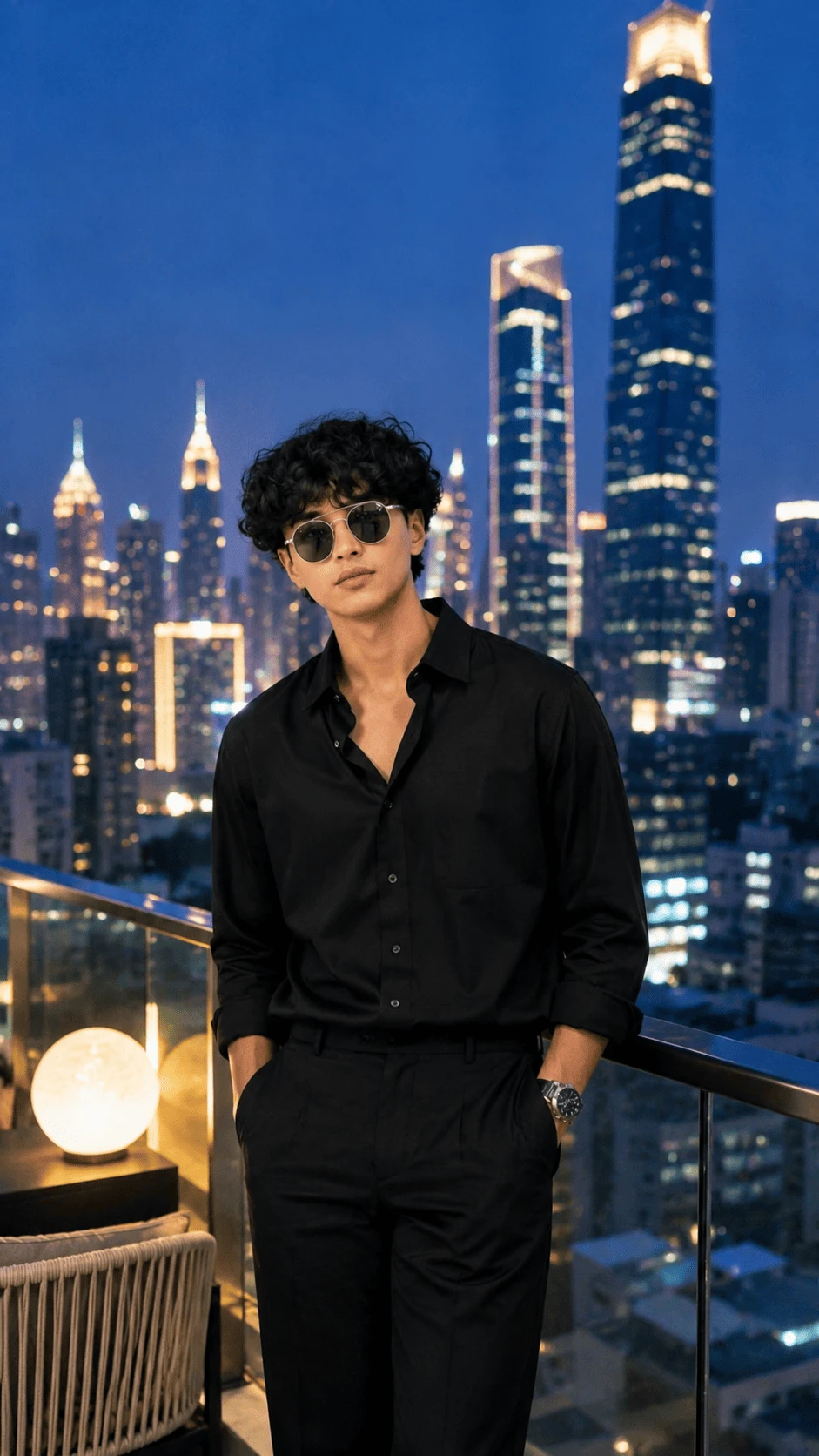
Create a stylish, cinematic and ultra-realistic luxury portrait using this AI photo prompt. This concept combines modern fashion, a sophisticated rooftop environment and a beautiful illuminated city skyline to create a premium editorial-style image suitable for social media, creative projects and AI photography inspiration.
About This AI Photo Concept
This AI photo concept features a young man standing on a modern rooftop terrace during the evening. He is dressed in an elegant all-black outfit with dark sunglasses and a premium wristwatch. Behind him is a spectacular metropolitan skyline filled with illuminated skyscrapers and atmospheric nighttime lighting.
The overall visual style is inspired by modern luxury lifestyle photography. The combination of dark clothing, blue evening tones, warm decorative lights and glowing city buildings creates a sophisticated cinematic atmosphere.
How to Create This Luxury Rooftop Portrait
To create a similar image, upload a clear reference photograph and use the prompt provided on this page. A high-quality reference image can help the AI maintain the subject's recognizable appearance, hairstyle, natural proportions and overall visual characteristics.
The main goal is to create a realistic fashion portrait while changing or enhancing the environment into a luxurious rooftop overlooking a modern city. The final result should maintain believable lighting, natural textures and realistic perspective.
Fashion and Outfit Details
The subject wears a sophisticated all-black outfit designed for a modern luxury fashion aesthetic. The black shirt and tailored trousers create a clean monochromatic appearance. Dark sunglasses add a stylish contemporary element, while the wristwatch provides a subtle premium fashion detail.
For the best result, the clothing should have realistic fabric folds, natural shadows and accurate material texture. Avoid making the clothing look painted, overly glossy or digitally generated.
Luxury Rooftop Environment
The background is designed as an elegant modern rooftop terrace. A transparent glass railing provides a clear view of the city skyline while maintaining a premium architectural atmosphere.
Subtle decorative lighting can be added around the rooftop to create a warm contrast against the cooler blue tones of the evening sky. Modern outdoor furniture and a softly glowing decorative lamp can further enhance the luxury lifestyle appearance.
Modern City Skyline
The city background should contain multiple contemporary skyscrapers with realistic illuminated windows. Buildings should have different heights and architectural designs to create natural depth and visual interest.
A small amount of atmospheric haze can be used between the subject and distant buildings. This helps create realistic separation and gives the photograph a professional cinematic depth-of-field effect.
Lighting Style
Lighting is one of the most important parts of this concept. Use a combination of cool blue ambient light from the evening sky and subtle warm lighting from the rooftop environment.
The subject's face should remain naturally illuminated without excessive brightness or artificial skin smoothing. Shadows should remain soft and physically believable.
Photography Style
The image should resemble professional luxury fashion photography captured with a high-end full-frame camera. A 50mm portrait lens look works well for maintaining realistic facial proportions while producing a natural background blur.
Use realistic depth of field, sharp subject details, natural skin texture and soft city bokeh. The image should have enough background detail to clearly communicate the rooftop and skyline environment without distracting from the subject.
Recommended Image Settings
- Aspect Ratio: 9:16
- Orientation: Vertical
- Style: Ultra-realistic cinematic photography
- Photography: Luxury editorial portrait
- Lighting: Blue-hour and warm ambient rooftop lighting
- Mood: Elegant, confident and sophisticated
- Camera Look: Professional full-frame DSLR or mirrorless
- Lens Look: 50mm portrait photography
- Quality: High-detail photorealistic
Reference Image Tips
For better results, use a clear reference photograph with good lighting and a visible face. Avoid extremely blurry images or photographs where the face is heavily covered.
If maintaining the subject's appearance is important, clearly instruct the AI to preserve recognizable facial characteristics, natural proportions, hairstyle and skin texture while changing only the requested environment, clothing or photographic style.
How to Improve Realism
Realism can be improved by describing small photographic details instead of relying only on general terms such as “8K” or “ultra-realistic.” Mention natural skin texture, individual hair strands, realistic fabric folds, physically accurate shadows, atmospheric depth and natural reflections.
The city background should also follow realistic perspective. Buildings farther away should appear slightly softer and less detailed than the subject in the foreground. This creates a more convincing photographic result.
Negative Prompt
Avoid cartoon effects, anime styling, plastic skin, excessive beauty filters, unrealistic facial changes, distorted anatomy, extra fingers, missing fingers, malformed hands, duplicated limbs, warped sunglasses, unrealistic clothing, floating objects, distorted buildings, artificial reflections, excessive HDR, oversaturated colors, blurry facial details, low-resolution textures, watermark, text, logo and visible AI artifacts.
Best Uses for This AI Photo
- Instagram portrait posts
- Instagram Reels covers
- Instagram Stories
- Luxury fashion inspiration
- AI photography experiments
- Social media profile content
- Creative portrait projects
- Digital wallpapers
- AI image prompt collections
Why This Style Works
The monochromatic black outfit creates a strong visual contrast against the blue city environment. Warm rooftop lighting adds depth while the illuminated skyscrapers provide a premium urban atmosphere.
The combination of fashion styling, modern architecture, nighttime photography and cinematic lighting makes this concept particularly useful for creating sophisticated social media visuals.
Final AI Prompt
Use the complete prompt provided above with a suitable reference image. Keep the composition vertical and prioritize natural facial details, realistic clothing, believable lighting and a detailed city background.
Final Result
The final image should look like a professionally captured luxury fashion portrait on a modern rooftop at night. The subject should appear confident and naturally posed, wearing an elegant all-black outfit with sunglasses while the illuminated city skyline creates a cinematic background.
Tip: For Instagram Stories and Reels, use a 9:16 vertical composition so the subject and skyline remain properly framed on mobile screens.
Comments