
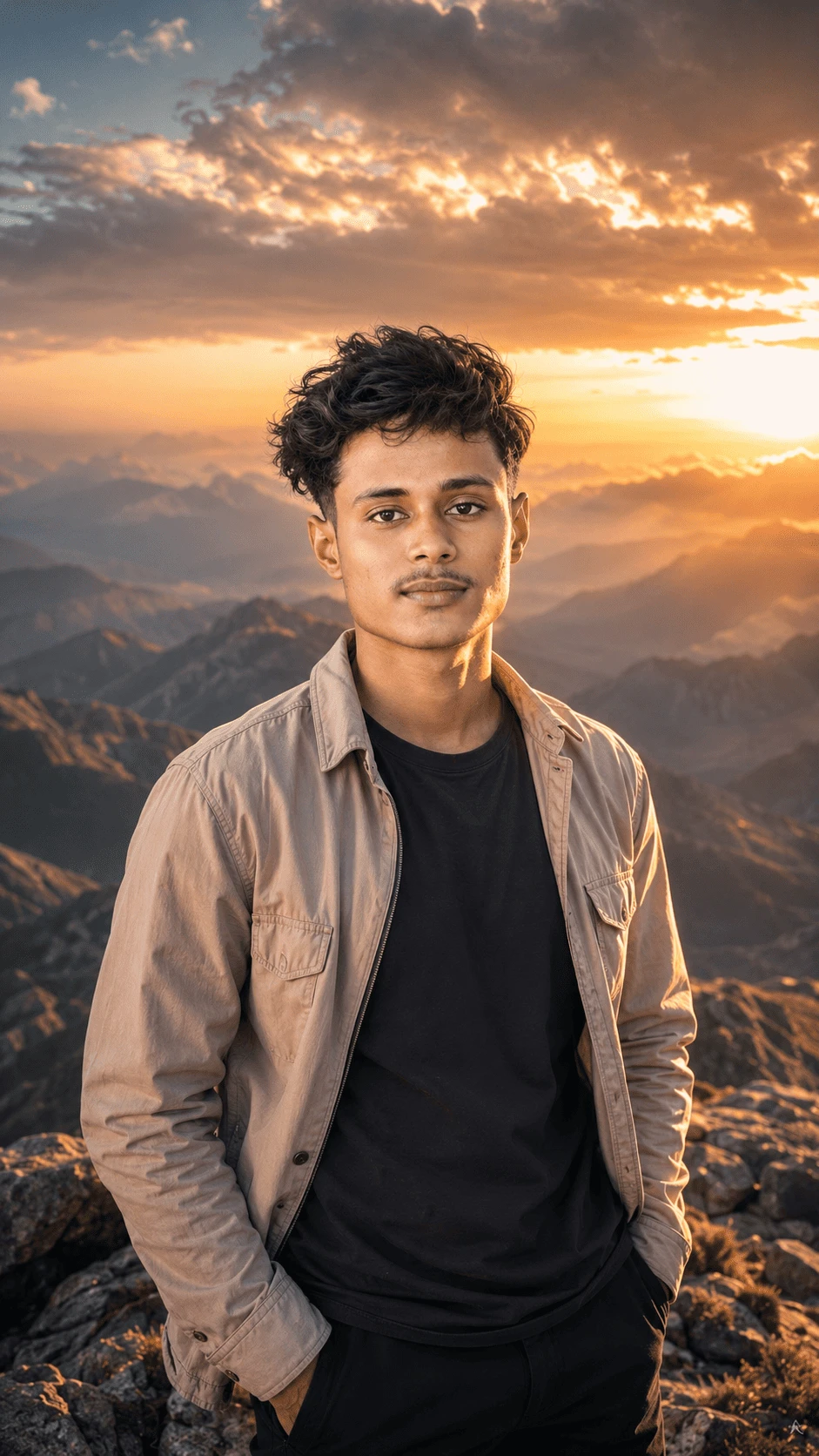
Create a stunning ultra-realistic mountain sunset portrait using this carefully designed AI photo prompt. This concept combines a natural portrait with dramatic mountain scenery, warm golden-hour sunlight and a cinematic travel atmosphere.
The prompt is designed for creators who want to transform a normal portrait into a professional-looking outdoor adventure photograph while maintaining realistic facial details, natural clothing textures and believable environmental lighting.
About This AI Photo Prompt
This AI photo concept features a young man standing in a dramatic mountain environment during sunset. Behind the subject is a wide landscape of layered mountains covered with atmospheric haze, while warm sunlight passes through dramatic clouds in the sky.
The combination of the subject's casual outfit, rocky mountain environment and golden sunset creates a premium travel-photography aesthetic. The final image should feel natural, cinematic and suitable for social media, wallpapers, creative projects and photography inspiration.
Mountain Landscape and Background
The background is an important part of this composition. Use a breathtaking mountainous landscape with multiple layers of distant peaks. The mountains should gradually become softer toward the horizon because of natural atmospheric perspective.
Add subtle environmental haze between the mountain layers to create realistic depth. The landscape should not look artificial or overly saturated. Natural rock formations, realistic terrain and believable atmospheric details should be maintained.
The background should complement the subject without distracting attention from the portrait. A shallow-to-moderate depth of field can be used so that the subject remains sharp while the distant environment retains cinematic detail.
Golden Hour Sunset Lighting
The most important visual element of this portrait is the warm sunset lighting. Place the sun behind or slightly to the side of the subject, creating a beautiful golden glow around the hair and shoulders.
Use warm orange and golden highlights while maintaining natural skin tones. The face should remain properly exposed and should not become excessively bright or dark.
Clouds in the sky should catch the warm light from the setting sun. This creates a dramatic yet peaceful atmosphere and gives the photograph a premium cinematic appearance.
Subject and Facial Details
When a reference image is provided, preserve the subject's recognizable facial appearance. Maintain the original facial proportions, hairstyle, natural skin texture and overall identity rather than generating a generic face.
Avoid excessive skin smoothing or beauty filters. Natural pores, subtle facial texture and realistic lighting should remain visible. The goal is to create a professional photograph while keeping the subject believable.
Clothing Details
The subject wears a light beige or tan utility-style jacket over a simple black T-shirt. The jacket should have realistic fabric texture, natural folds, seams and subtle wrinkles.
The black T-shirt should have a realistic cotton appearance with natural shadows. Dark trousers can complete the casual outdoor adventure look.
Clothing should respond naturally to the lighting. Warm sunset highlights can appear on the jacket while the darker clothing retains realistic shadows and contrast.
Pose and Composition
Use a natural standing pose suitable for a travel portrait. Keep the subject relaxed and confident while maintaining realistic body proportions.
The composition should be vertical and suitable for modern social media platforms. Keep the subject large enough to show facial details while preserving enough background space to showcase the mountains and sunset.
A 9:16 vertical composition works especially well for Instagram Stories, Reels covers, mobile wallpapers and other smartphone-focused content.
Photography Style
Use the visual characteristics of professional DSLR or mirrorless photography. The final result should include realistic lens depth of field, natural highlights, controlled shadows and accurate environmental perspective.
High dynamic range can help preserve details in both the bright sunset sky and darker mountain areas. However, avoid excessive HDR processing because it can make the image appear artificial.
Recommended AI Image Settings
- Aspect Ratio: 9:16
- Orientation: Vertical
- Style: Ultra-realistic cinematic photography
- Lighting: Golden-hour sunset
- Mood: Peaceful, adventurous and inspirational
- Environment: Mountain landscape
- Quality: High-detail photorealistic
- Camera Style: Professional DSLR photography
- Reference Image: Recommended
How to Create This Mountain Sunset Portrait
Start by uploading a clear reference portrait. A sharp image with visible facial details generally provides better results when the goal is to preserve the subject's appearance.
Copy the main prompt and provide it together with the reference image. Make sure the AI understands that the face, natural proportions and overall appearance should remain consistent.
The background can then be transformed into a dramatic mountain environment with a warm sunset. The lighting should be adjusted so that the subject and background appear to exist in the same physical environment.
Tips for Better Results
- Use a clear, high-resolution reference image.
- Keep the face natural instead of applying excessive beauty effects.
- Ask for realistic skin texture and natural facial details.
- Use warm golden-hour lighting for the cinematic sunset effect.
- Keep the mountains realistic and naturally atmospheric.
- Maintain realistic clothing folds and fabric texture.
- Use a vertical 9:16 composition for social media.
- Avoid excessive saturation and artificial HDR effects.
- Check hands and fingers carefully after generation.
- Remove unwanted text, logos and watermarks from the final image.
Negative Prompt
Avoid plastic skin, excessive beauty filters, face reshaping, unrealistic eyes, distorted facial features, unnatural skin tone, extra fingers, missing fingers, malformed hands, duplicated body parts, bad anatomy, unrealistic body proportions, blurry face, low-resolution details, artificial mountains, fake clouds, oversaturated colors, excessive HDR, cartoon effects, painting effects, unrealistic shadows, unnatural lighting, warped clothing, watermark, unwanted text and AI artifacts.
Why This Prompt Works
This prompt combines several important elements of professional outdoor photography: subject preservation, environmental depth, natural lighting, realistic clothing and cinematic composition.
Instead of describing only the background, the prompt also explains how the light should interact with the subject. This helps create a more believable final image where the person does not appear artificially placed over a separate background.
The detailed instructions about atmospheric haze and layered mountains also help establish depth. Meanwhile, the golden-hour lighting provides a warm visual mood that works especially well for travel and adventure portraits.
Best Uses for This AI Photo
- Instagram Posts
- Instagram Stories
- Instagram Reels Covers
- Facebook Posts
- YouTube Community Posts
- Mobile Wallpapers
- Travel Photography Inspiration
- AI Portrait Editing
- Adventure-Themed Social Media Content
- Creative Photography Projects
SEO-Friendly Image Description
This ultra-realistic AI portrait shows a young man standing in a dramatic mountain landscape during golden hour. Warm sunset light illuminates the subject while layered mountains and cinematic clouds create a breathtaking outdoor background.
Final Result
The final image should look like a professional travel photographer captured the subject during a beautiful mountain sunset. The face should remain natural and recognizable, the clothing should have realistic fabric details, and the mountain environment should blend naturally with the subject.
The warm sunset, dramatic clouds, atmospheric mountain layers and realistic portrait lighting together create a cinematic adventure aesthetic suitable for modern social media content.
Conclusion
This Mountain Sunset Portrait AI Photo Prompt is ideal for anyone who wants to create a realistic cinematic outdoor portrait from a reference image. By combining natural facial details, realistic clothing, golden-hour lighting and dramatic mountain scenery, you can create a premium-looking AI photograph with a professional travel photography feel.
Copy the prompt, upload your reference image, select a 9:16 vertical format and generate your cinematic mountain sunset portrait.

Comments