
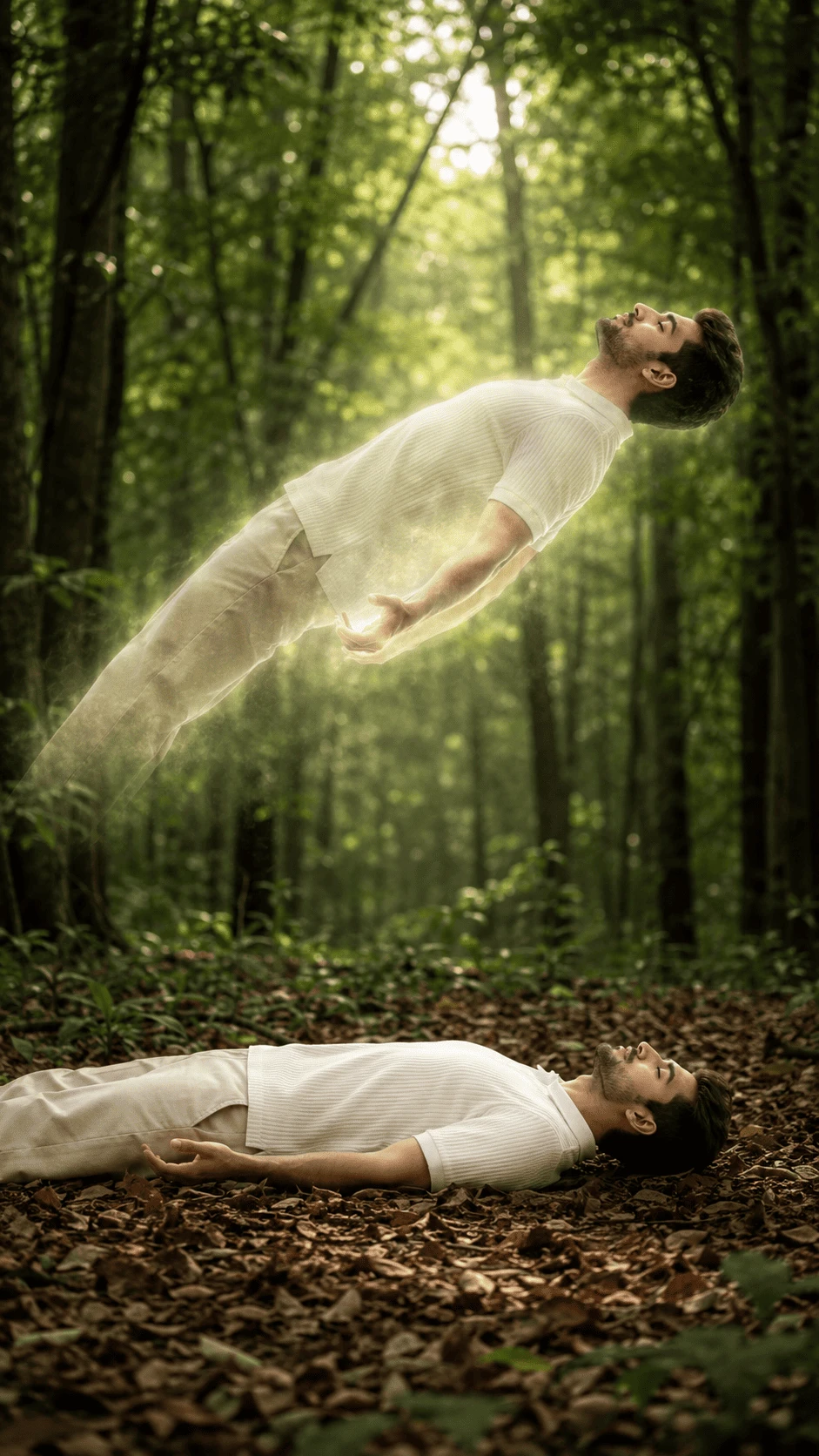
Create a mysterious, peaceful and cinematic out-of-body experience image with this detailed AI photo prompt. The concept shows a person peacefully lying on a forest floor while an ethereal version of the same person appears to float above the body.
About This AI Photo Concept
An out-of-body experience is often represented in visual art through a person's physical body remaining on the ground while a glowing spiritual or ethereal version appears to rise above it. This AI photography concept combines that idea with a peaceful natural forest environment.
The scene uses soft sunlight, atmospheric forest haze, realistic foliage and a subtle golden-white glow to create a dreamlike cinematic appearance. The goal is to make the supernatural effect look integrated into a realistic photographic environment.
Complete AI Image Prompt
Copy the prompt below and use it with your preferred AI image generator:
Create an ultra-realistic cinematic out-of-body experience scene using the reference image. Show the same adult male subject appearing twice in one realistic forest composition. The physical body is lying peacefully on its back on a natural forest floor covered with dry leaves, with eyes closed and arms resting naturally beside the body. Above the body, create a second ethereal version of the same subject floating horizontally several feet above the ground. The floating figure should be aligned naturally with the body below, creating a believable spiritual projection effect. The floating figure should appear semi-transparent and softly luminous, with a subtle warm white and golden glow around the body. Keep the facial appearance, hairstyle, clothing style and body proportions visually consistent between the grounded body and the floating figure. Dress the subject in a simple off-white ribbed short-sleeve shirt and matching light-colored trousers. Preserve realistic fabric texture, natural folds and believable clothing details. Create a dense, peaceful green forest surrounding the scene. Use tall trees, leafy branches, soft atmospheric haze, natural vegetation and a forest floor covered with dry leaves. Warm sunlight should filter through the trees from above, creating beautiful volumetric light rays around the floating figure. Add a subtle golden-white aura without making the effect look cartoonish or overly artificial. The floating body should have realistic transparency around the edges while retaining enough detail to clearly recognize the same person. Use soft glowing particles and atmospheric light around the ethereal figure. The grounded body should remain solid, natural and physically connected to the forest floor. Both figures should have accurate anatomy, realistic hands, natural fingers and believable body proportions. Use professional cinematic photography, realistic skin texture, detailed hair, physically believable lighting, natural shadows, realistic foliage, shallow atmospheric depth and high dynamic range. Create a mysterious, peaceful, spiritual and dreamlike mood while keeping the overall image photorealistic. Avoid distorted faces, inconsistent identity, duplicated facial features, extra fingers, missing fingers, fused fingers, malformed hands, distorted limbs, unnatural body proportions, floating body errors, unrealistic transparency, cartoon effects, excessive glow, plastic skin, blurry details, oversaturated colors, warped trees, artificial foliage, low resolution, watermark, logo, text and AI artifacts. Use vertical 9:16 composition with the entire scene clearly visible and balanced.Scene Composition
The composition should clearly show both versions of the subject. The physical body should remain on the forest floor in the lower portion of the image, while the ethereal version should appear above it with enough space between the two forms.
The two figures should have consistent orientation and clothing. This helps create the visual impression that the upper figure is a spiritual projection of the physical body.
Physical Body
The physical body should appear peaceful and relaxed on the forest floor. The subject should lie naturally on their back with the eyes closed and the arms positioned comfortably beside the body.
The clothing should remain realistic, with detailed ribbed fabric, natural folds and believable contact with the ground and surrounding leaves.
Ethereal Floating Figure
The upper figure is the main fantasy element of the composition. It should appear to float horizontally above the physical body while maintaining a natural human posture.
Use subtle transparency around the edges and a soft luminous aura. Avoid making the figure completely transparent because the subject should remain clearly recognizable.
Lighting and Glow
Warm sunlight should pass through the forest canopy and create natural volumetric rays. The light can become slightly brighter around the ethereal figure to reinforce the supernatural concept.
The glow should remain subtle and photographic. Excessive brightness can hide important details and make the result appear like a digital illustration.
Forest Environment
Use a dense green forest with tall trees, natural branches, layered foliage and a realistic forest floor. Dry leaves should cover the ground around the physical body.
Soft background blur and atmospheric haze can create depth between the foreground subject and distant trees.
Color and Mood
Use natural forest greens combined with warm golden sunlight and soft neutral clothing. The overall mood should feel peaceful, mysterious and dreamlike.
A balanced color palette helps maintain the appearance of professional cinematic photography.
Photography Style
The final image should look like a high-end cinematic photograph rather than a cartoon or fantasy illustration. Use realistic skin texture, detailed hair, accurate fabric, natural foliage and physically believable light.
Recommended Settings
- Aspect Ratio: 9:16
- Style: Ultra-realistic cinematic photography
- Lighting: Warm natural sunlight with volumetric rays
- Environment: Dense green forest
- Mood: Peaceful, mysterious and dreamlike
- Effect: Subtle ethereal glow
- Composition: Vertical full-scene portrait
- Quality: High detail and photorealistic
- Reference Image: Recommended
Negative Prompt
distorted face, inconsistent identity, duplicated face, extra fingers, missing fingers, fused fingers, malformed hands, distorted limbs, bad anatomy, unnatural body proportions, unrealistic floating pose, excessive transparency, excessive glow, cartoon effect, anime style, plastic skin, blurry face, blurry details, warped trees, artificial foliage, unrealistic shadows, oversaturated colors, low resolution, watermark, logo, text and AI artifactsHow to Create This AI Photo
- Choose a clear reference image of the subject.
- Upload the reference image into your AI image generator.
- Copy the complete prompt from this page.
- Select a vertical 9:16 aspect ratio.
- Ask the AI to preserve the subject's appearance and clothing.
- Generate the image with the ethereal floating-body effect.
- Check the face, hands, body alignment and transparency.
- Regenerate if the upper or lower figure has anatomy or identity errors.
Tips for Better Results
Use a sharp reference photograph whenever possible. A clear reference helps the model understand the subject's appearance and clothing more accurately.
For the best supernatural effect, describe the floating figure as an ethereal version of the same person instead of simply requesting a second person.
Keep the glow subtle. A realistic glow combined with natural sunlight generally produces a more convincing cinematic result.
Improving Subject Consistency
When using a reference image, clearly instruct the AI to maintain consistent facial appearance, hairstyle, clothing and body proportions between the physical and ethereal versions.
The two figures should look like the same person rather than two unrelated characters.
Improving the Floating Effect
Describe the upper figure as horizontally floating several feet above the physical body. Add a soft luminous edge and subtle transparency while keeping the main body details visible.
This combination creates a recognizable out-of-body visual without making the upper figure disappear into the background.
Improving Forest Depth
Use layered trees, foreground leaves, mid-ground vegetation and a softly blurred distant forest. Natural atmospheric haze can help separate the floating figure from the background.
Common AI Problems
Problem: The Two Figures Look Different
Strengthen the instruction that both figures must represent the same person and preserve consistent facial features, hairstyle and clothing.
Problem: Floating Figure Looks Like a Ghost
Reduce transparency and excessive glow. Ask for a subtle ethereal projection with realistic human details.
Problem: Body Alignment Looks Wrong
Ask the AI to align the upper figure naturally with the physical body below while keeping a clear vertical separation.
Problem: Hands Are Distorted
Request anatomically correct hands and natural finger placement. Regenerate when fingers or wrists look unnatural.
Problem: Forest Looks Artificial
Request natural tree bark, realistic leaves, physically believable sunlight and photographic depth of field.
Creative Variations
Moonlit Forest
Replace the warm daylight with cool moonlight while maintaining the same out-of-body composition and subtle ethereal glow.
Misty Forest
Add soft morning mist between the trees and use diffused sunlight to create a calm atmospheric appearance.
Golden Hour Version
Use warm golden-hour sunlight filtering through the trees for a more emotional and cinematic result.
Magical Forest Version
Add subtle glowing particles and atmospheric light while keeping the trees, leaves and subject photorealistic.
Social Media Use
The 9:16 composition works well for vertical social media content. The image can be used as a creative visual for Instagram Stories, Reels, YouTube Shorts and mobile wallpapers.
Frequently Asked Questions
What is an out-of-body AI photo?
It is a creative visual concept where a physical person is shown separately from an ethereal or spiritual representation of the same person.
Which aspect ratio should I use?
Use 9:16 when creating vertical content for Instagram Stories, Reels, YouTube Shorts and mobile devices.
Should I use a reference image?
Yes. A clear reference image is recommended when consistency of the subject's appearance is important.
Can I change the forest?
Yes. You can replace the forest with a mountain, beach, rooftop, bedroom or another environment while keeping the same ethereal concept.
Can I change the clothing?
Yes. Replace the clothing description with your preferred outfit while maintaining the same lighting and floating-body effect.
Final Result
The desired result is a peaceful and cinematic forest scene showing a person resting on the ground while a softly glowing ethereal version of the same person floats above. Natural forest lighting, realistic foliage, subtle transparency and professional photographic detail should make the supernatural concept feel visually believable.
Copy the prompt, upload your reference image, select 9:16 and create your own cinematic out-of-body experience portrait.
Comments