
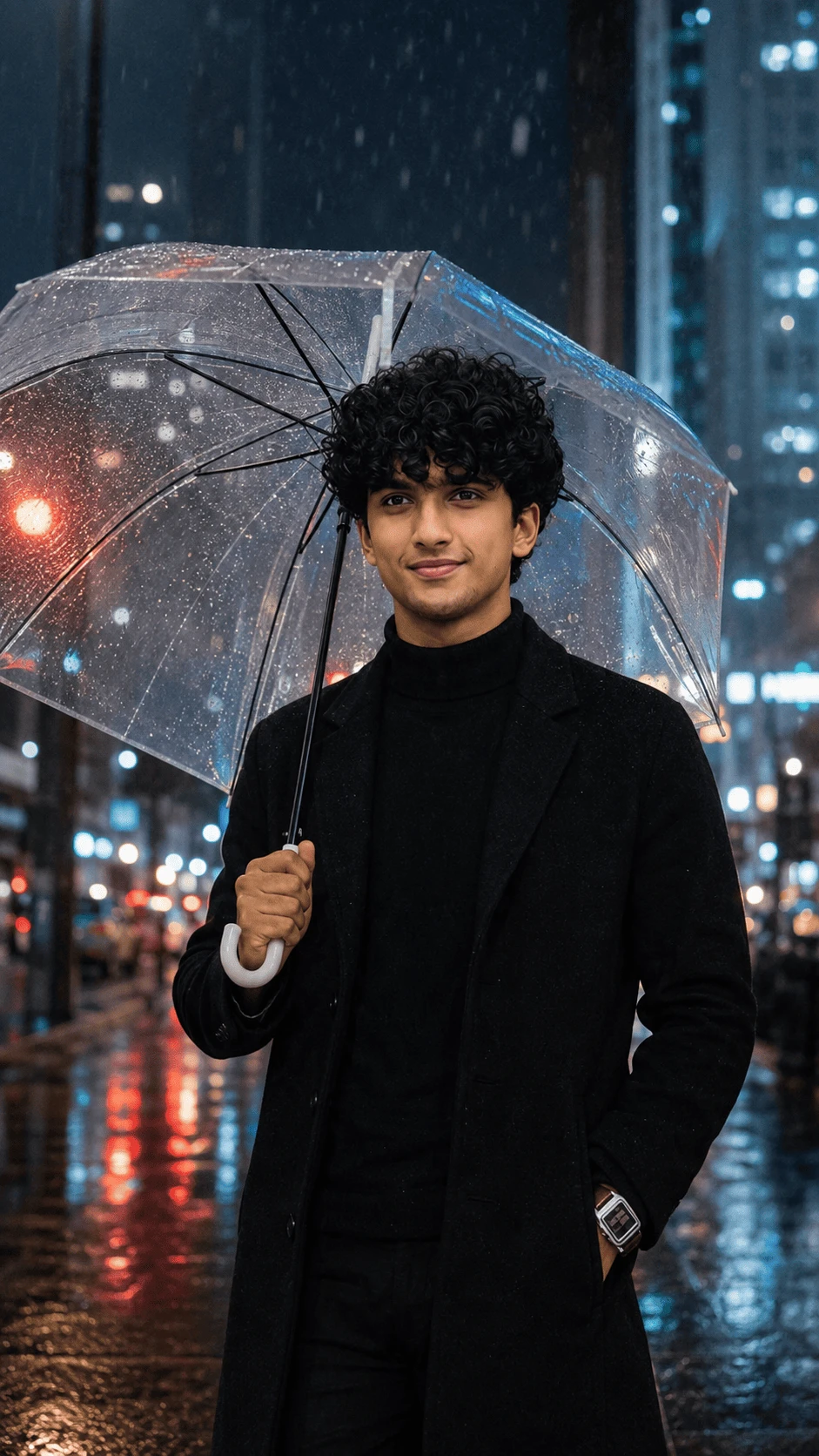
Create a stylish and cinematic rainy-night portrait with this detailed AI image prompt. This concept combines a sophisticated black outfit, transparent umbrella, realistic rainfall and colorful city lights to create a premium urban photography look.
About This AI Photo
Rainy city photography can create a dramatic visual atmosphere because wet streets naturally reflect lights from buildings, vehicles and street lamps. This AI photo concept uses those elements together with a transparent umbrella and an elegant black outfit.
The goal is to create an image that looks like a professionally photographed nighttime fashion portrait rather than an artificial digital illustration.
Complete AI Photo Prompt
Copy the prompt below and use it with your preferred AI image generator.
Create an ultra-realistic cinematic portrait using the reference image. Preserve the subject's facial appearance, natural facial structure, hairstyle, skin tone, body proportions and overall identity as accurately as possible. Keep the subject looking natural and realistic without changing the core facial characteristics. Place the subject standing confidently on a modern city street at night during rainfall. He is holding a transparent clear umbrella above his head with one hand. The umbrella should contain realistic raindrops, visible black ribs and natural reflections from the surrounding city lights. Dress the subject in an elegant all-black winter outfit consisting of a black turtleneck sweater, tailored black overcoat and black trousers. Keep the clothing sophisticated, minimal and realistic with natural fabric texture, folds and stitching. Create a premium nighttime urban environment with tall modern buildings in the background. Add colorful out-of-focus city lights, illuminated windows, streetlights and distant traffic. The road should be wet from the rain and covered with realistic reflections of blue, white, red and warm city lights. Add small puddles and subtle water reflections without making the street look artificial. Show realistic rainfall throughout the scene. Include visible individual raindrops in the foreground and background, with some droplets catching the city lights. Use cinematic blue and neutral tones with subtle warm highlights from traffic and buildings. Create realistic contrast between the dark black outfit and the bright urban background. Use professional DSLR photography, realistic skin texture, detailed curly hair, natural facial details, physically accurate lighting, cinematic depth of field, realistic bokeh, high dynamic range and premium editorial photography quality. The transparent umbrella should remain physically believable with realistic water droplets, reflections and transparency. Keep the subject's hands anatomically correct with natural fingers and realistic grip on the umbrella handle. Create a sophisticated, moody, romantic and cinematic rainy-night atmosphere. Use realistic perspective and natural body proportions. Keep the composition balanced with the subject as the main focal point while the city environment remains visible. Avoid distorted facial features, changed identity, artificial skin, excessive beauty filters, plastic skin, deformed hands, extra fingers, missing fingers, fused fingers, bad anatomy, distorted clothing, unrealistic umbrella structure, excessive rain, fake reflections, oversaturated colors, cartoon style, anime style, blurry face, low resolution, watermark, logo, text and AI artifacts. Use a vertical 9:16 composition suitable for Instagram Reels, Stories, Pinterest and mobile wallpapers.Why This Prompt Works
The prompt focuses on several important visual elements at the same time: the subject, clothing, transparent umbrella, rain, city background, wet road, reflections and cinematic lighting.
Giving the AI clear instructions about each element helps create a more controlled composition. Instead of simply asking for a rainy portrait, the prompt describes how the rain, umbrella and city lights should interact with the environment.
Rainy Night Environment
The background should look like a modern urban city at night. Tall buildings, illuminated windows and distant traffic can add depth to the composition.
The city should remain slightly out of focus so the subject remains the primary visual element. Realistic bokeh can make the background lights appear more photographic.
Transparent Umbrella Details
The transparent umbrella is one of the most important elements of this concept. It should look like real clear plastic with visible structural ribs and realistic water droplets.
Reflections from surrounding lights should appear naturally on the umbrella surface. The umbrella should not look like a glowing or completely invisible object.
Realistic Rain
Rain should be visible throughout the composition without covering the subject's face. Some droplets can appear sharper in the foreground while distant rain can remain softer.
Lighting the rain with city lights can create subtle highlights and improve the cinematic appearance.
Wet Street Reflections
A wet road is essential for creating the nighttime cinematic look. Blue, red, white and warm lights can reflect across the pavement and puddles.
The reflections should follow realistic perspective and should not appear as random colored patches.
Fashion and Clothing
The subject wears a sophisticated black winter outfit. A black turtleneck combined with a tailored black overcoat creates a clean and modern fashion-editorial appearance.
Natural fabric texture, realistic folds and subtle highlights should be maintained so the clothing looks physically believable.
Lighting Style
Use a combination of cool urban lighting and subtle warm highlights. The cool tones can come from buildings and streetlights while warmer tones can come from traffic and storefronts.
The subject's face should remain naturally illuminated and should not become excessively bright compared with the background.
Photography Style
For a premium result, use the visual characteristics of professional DSLR photography. Natural skin texture, realistic depth of field, controlled bokeh and high dynamic range can help the final image look more photographic.
Recommended Settings
- Aspect Ratio: 9:16
- Style: Ultra-realistic cinematic photography
- Environment: Modern city at night
- Weather: Rainy
- Lighting: Cinematic urban lighting
- Mood: Moody, elegant and sophisticated
- Camera Style: Professional DSLR photography
- Depth of Field: Cinematic shallow depth of field
- Quality: High-detail photorealistic
- Reference Image: Recommended
Negative Prompt
distorted face, changed identity, artificial skin, plastic skin, excessive beauty filter, deformed hands, extra fingers, missing fingers, fused fingers, bad anatomy, distorted clothing, unrealistic umbrella, broken umbrella ribs, excessive rain, fake reflections, unrealistic wet road, oversaturated colors, cartoon, anime, illustration, blurry face, low resolution, watermark, logo, text, duplicate person and AI artifactsHow to Create the Image
- Choose a clear reference photograph.
- Upload the reference image into your AI image generator.
- Copy the complete prompt from this page.
- Select a vertical 9:16 aspect ratio.
- Generate the image using the reference image.
- Check the face, hands, umbrella and clothing carefully.
- Regenerate if there are anatomy or reflection problems.
- Choose the most realistic final result.
Tips for Better Results
Use a sharp and well-lit reference photo when facial consistency is important. Avoid extremely blurry reference images because they can make the generated face less consistent.
For realistic rain, ask for individual droplets, wet clothing details and reflections rather than simply requesting a heavy rain effect.
Keep the umbrella transparent but physically visible. Realistic water droplets and structural ribs make the umbrella much more convincing.
How to Make the Image More Cinematic
Add realistic bokeh in the distant city lights and use a shallow depth of field. Keep the subject sharp while allowing distant buildings and traffic lights to become softly blurred.
A balanced combination of cool nighttime tones and warm highlights can create a premium cinematic color atmosphere.
Common AI Problems and Solutions
Problem: The Umbrella Looks Artificial
Ask the AI to add realistic transparent plastic, visible umbrella ribs, water droplets and natural reflections. Avoid describing the umbrella as glowing or magical.
Problem: Rain Covers the Face
Specify that the face should remain clearly visible and naturally illuminated while rain appears around the subject.
Problem: Hands Look Distorted
Explicitly request anatomically correct hands and natural fingers. If necessary, regenerate the image with stronger hand-detail instructions.
Problem: Road Reflections Look Fake
Ask for physically realistic reflections following the wet pavement perspective. The reflections should correspond to actual lights in the scene.
Problem: Background Is Too Sharp
Request cinematic depth of field and realistic urban bokeh so that the subject remains the main focal point.
Creative Variations
Neon Rainy City
Add colorful neon signs and stronger reflections on the wet road for a modern cyberpunk-inspired urban atmosphere while keeping the subject photorealistic.
Luxury Fashion Version
Replace the simple black coat with a premium tailored overcoat and add sophisticated architectural surroundings for an editorial fashion photography look.
Romantic Rainy Night
Use softer warm streetlights, gentle rainfall and subtle background bokeh to create a romantic cinematic mood.
Minimal Dark Version
Reduce the number of background lights and use a darker city environment with soft highlights on the umbrella and face.
Best Aspect Ratio for Social Media
A 9:16 vertical composition is recommended for Instagram Stories, Reels, YouTube Shorts and mobile wallpapers. The tall format allows the full umbrella, subject and wet street to remain visible.
Frequently Asked Questions
Can I use my own photo as a reference?
Yes. A clear reference image can help the AI maintain the subject's overall appearance, pose and clothing characteristics.
Can I change the outfit?
Yes. Replace the clothing description with a suit, casual outfit, leather jacket or another style while keeping the rainy-night environment.
Can I change the city?
Yes. You can customize the environment to resemble a busy downtown street, luxury business district, quiet street or modern skyline.
Can I use this prompt for a female subject?
Yes. Adjust the subject description and clothing while keeping the same umbrella, rain, city lights and cinematic photography instructions.
What makes the image look realistic?
Realistic skin texture, natural lighting, physically believable rain, detailed umbrella water droplets, wet-road reflections and cinematic depth of field all contribute to a more realistic result.
Final Result
The final image should look like a professionally photographed rainy-night fashion portrait. The subject should remain sharp and natural while the transparent umbrella, rainfall, city lights and wet-road reflections create a sophisticated cinematic atmosphere.
Copy the prompt, upload your reference image, select 9:16 and create your own ultra-realistic rainy city portrait.
Comments