
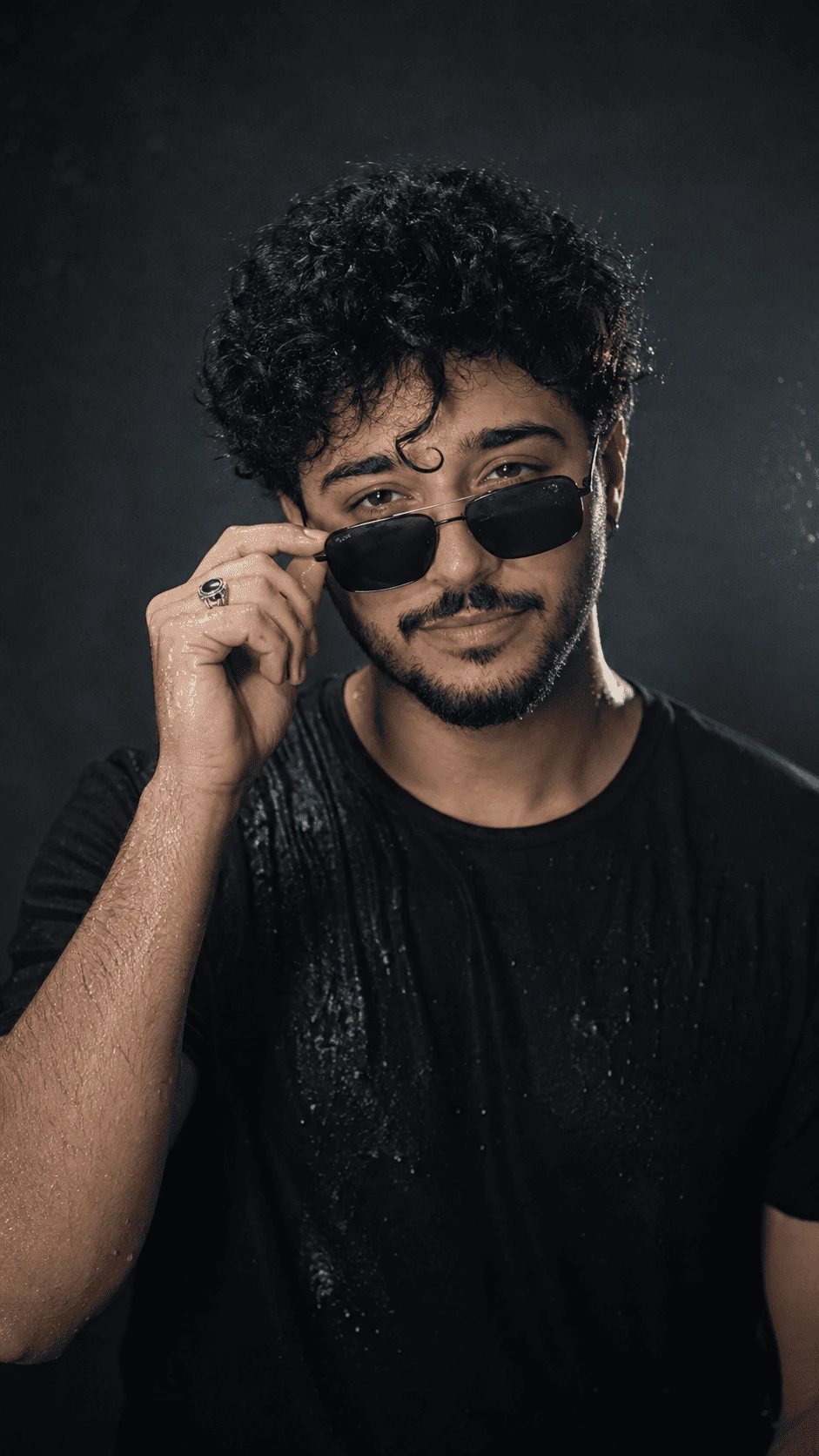
Create a stylish, dramatic and ultra-realistic cinematic portrait with this AI photo prompt. The concept features a confident male subject wearing a black T-shirt and dark sunglasses, with naturally curly wet hair, realistic water droplets and professional studio lighting.
About This AI Photo
This AI photography concept focuses on a dark and sophisticated editorial portrait. The subject is photographed against a deep charcoal background while wearing a simple black T-shirt and black sunglasses. Wet hair and realistic water droplets add texture and create a dramatic cinematic atmosphere.
The image uses controlled studio lighting, realistic skin texture, detailed curly hair and subtle highlights on the water droplets. The result is designed to look like a professional fashion or editorial photograph rather than a simple AI-generated image.
Complete AI Image Prompt
Copy the prompt below and use it with your preferred AI image generator:
Create an ultra-realistic cinematic portrait using the reference image as the main visual reference. Preserve the subject's natural facial appearance, face shape, hairstyle, beard, body proportions and recognizable features when a reference image is provided. Do not unnecessarily reshape, beautify or replace the face. Show the subject wearing a simple black crew-neck T-shirt and stylish black rectangular sunglasses. The subject is holding the sunglasses slightly downward with one hand, creating a confident and fashionable expression. The subject has naturally curly, voluminous dark hair with realistic individual hair strands and slightly wet texture. Add realistic water droplets and subtle moisture on the hair, face, arms and black T-shirt to create a dramatic wet-look photography effect. Use a dark charcoal studio background with subtle atmospheric texture. Create professional cinematic studio lighting with a soft key light illuminating the face and hair, gentle rim lighting around the shoulders and subtle highlights on the water droplets. Maintain realistic skin texture, natural pores, facial hair details, realistic eyes, believable hands and accurate anatomy. The sunglasses should have realistic dark lenses, thin frames and natural reflections. The hand holding the sunglasses must have anatomically correct fingers and a natural grip. Use shallow depth of field with the subject sharply focused and the background softly blurred. Add high dynamic range, realistic contrast, detailed textures and premium editorial photography quality. Create a sophisticated, moody, confident and cinematic fashion portrait. Avoid distorted face, face replacement, excessive beauty filter, plastic skin, unrealistic skin smoothing, extra fingers, missing fingers, fused fingers, distorted hands, deformed arms, duplicated body parts, warped sunglasses, unrealistic reflections, artificial hair, blurry face, oversaturated colors, cartoon style, anime style, low resolution, watermark, logo, text and AI artifacts. Use vertical 9:16 composition suitable for Instagram Reels, Instagram Stories, YouTube Shorts and mobile wallpapers.Portrait Composition
The subject should occupy most of the vertical frame while leaving enough space around the head and shoulders to maintain a professional portrait composition. The face, sunglasses and wet curly hair should remain the main visual focus.
The hand holding the sunglasses should be clearly visible. Maintain a natural pose and avoid placing the hand too close to the edge of the frame.
Wet Hair Effect
The wet-hair effect is one of the key visual elements of this concept. The hair should remain naturally curly and voluminous while appearing slightly wet. Individual strands should be visible, with realistic highlights created by the studio lighting.
Avoid making the hair look completely flat, plastic or artificially glossy. The moisture should look physically believable.
Water Droplet Details
Add small realistic water droplets to the hair, face, arms and black T-shirt. The droplets should react naturally to the light and create tiny highlights without making the image look exaggerated.
Water droplets should remain sharp enough to provide realistic texture while maintaining the overall cinematic appearance.
Sunglasses Styling
Use dark rectangular sunglasses with realistic lenses and subtle reflections. The sunglasses should fit naturally on the subject's face and maintain correct proportions.
The subject can hold the sunglasses slightly downward with one hand to create a confident editorial pose. The fingers and grip should remain anatomically accurate.
Lighting Setup
Use professional studio lighting with a soft key light directed toward the face. Add subtle rim lighting around the hair and shoulders to separate the subject from the dark background.
Keep the lighting dramatic but realistic. Highlights should appear naturally on the wet hair, skin and water droplets.
Background
Use a dark charcoal or black studio background with subtle texture. The background should remain simple and unobtrusive so the subject becomes the main focus.
A slight background blur can create additional depth while maintaining a premium photography appearance.
Photography Style
The final image should resemble premium editorial fashion photography. Use realistic skin pores, detailed facial hair, natural hair strands, accurate clothing texture and physically believable lighting.
A shallow depth of field can be used to keep the face and sunglasses sharp while gently separating the background.
Recommended Settings
- Aspect Ratio: 9:16
- Style: Ultra-realistic cinematic photography
- Lighting: Dramatic studio lighting
- Background: Dark charcoal studio background
- Mood: Moody, confident and sophisticated
- Composition: Vertical close-up portrait
- Quality: High detail and photorealistic
- Depth of Field: Shallow cinematic depth of field
- Reference Image: Recommended
Negative Prompt
distorted face, face replacement, unrealistic facial features, excessive beauty filter, plastic skin, over-smoothed skin, extra fingers, missing fingers, fused fingers, distorted hands, deformed arms, duplicated body parts, warped sunglasses, broken glasses, unrealistic reflections, artificial hair, flat hair, cartoon style, anime style, blurry face, blurry eyes, bad anatomy, unrealistic water droplets, excessive water, oversaturated colors, extreme contrast, low resolution, text, watermark, logo and AI artifactsHow to Create This AI Portrait
- Choose a clear reference photograph.
- Upload the reference image into your AI image generator.
- Copy the complete prompt from this page.
- Select a vertical 9:16 aspect ratio.
- Use a photorealistic or cinematic photography style.
- Generate the image and inspect the face, hands, sunglasses and hair.
- If any details are distorted, regenerate using the negative prompt.
Tips for Better Results
Use a sharp and well-lit reference image when facial consistency is important. A clear reference gives the AI more useful visual information about the subject.
Keep the wet effect subtle and realistic. Too many water droplets or excessive shine can make the result look artificial.
For a premium editorial appearance, emphasize natural skin texture, detailed hair strands, realistic fabric and professional studio lighting.
How to Improve Facial Detail
Ask the AI to preserve the subject's natural facial proportions and recognizable features. Avoid unnecessary instructions that change the face or make the subject look overly beautified.
Realistic pores, subtle facial hair and natural skin texture can help the final portrait look more photographic.
How to Improve Hair Detail
Describe the hair as naturally curly, dense and slightly wet. Ask for individual strands and realistic highlights instead of a smooth artificial texture.
How to Improve Sunglasses
Specify the sunglasses shape, frame thickness and lens appearance. Ask for subtle realistic reflections and natural placement on the face.
Instagram Reels and Stories
The 9:16 format is ideal for Instagram Reels and Stories. Keep the face, sunglasses and hand inside the central safe area so important details are less likely to be cropped.
YouTube Shorts
This vertical portrait can also be used as a visual for YouTube Shorts. The strong contrast between the subject and dark background can work well for mobile viewing.
Mobile Wallpaper
The vertical composition can be adapted for mobile wallpapers. Keep the subject centered and leave some clean space around the upper portion of the image if text or icons need to be placed over the artwork.
Creative Variations
Black and White Version
Convert the portrait into a high-contrast monochrome editorial photograph while preserving realistic skin texture and wet hair details.
Rainy Night Version
Replace the studio environment with a dark rainy-night atmosphere while keeping the wet hair, sunglasses and cinematic lighting.
Luxury Fashion Version
Keep the black outfit and sunglasses but introduce premium editorial lighting, a sophisticated studio background and subtle fashion-magazine styling.
Neon Cinematic Version
Add subtle colored environmental reflections while maintaining realistic skin tones and natural facial details.
Common AI Problems
Problem: Hair Looks Fake
Ask for individual curly hair strands, natural moisture and realistic highlights. Avoid excessive gloss.
Problem: Sunglasses Are Distorted
Specify a simple rectangular frame and realistic lens reflections. Regenerate if the frame becomes asymmetrical.
Problem: Hands Look Incorrect
Use stronger anatomy instructions and specifically request natural fingers, correct finger count and a believable grip on the sunglasses.
Problem: Skin Looks Too Smooth
Request natural pores, realistic skin texture and subtle imperfections instead of beauty-filtered skin.
Problem: Background Is Distracting
Use a simple dark studio background and shallow depth of field to keep attention on the subject.
Best Uses
- Instagram Reels
- Instagram Stories
- YouTube Shorts
- Profile Photography
- Fashion-Inspired AI Artwork
- Cinematic Portraits
- Creative Photography Concepts
- Mobile Wallpapers
Frequently Asked Questions
What is this AI photo prompt?
This prompt is designed to create a cinematic male portrait featuring wet curly hair, dark sunglasses, a black T-shirt and dramatic studio lighting.
Which aspect ratio is recommended?
A 9:16 vertical aspect ratio is recommended for Instagram Reels, Stories, YouTube Shorts and mobile wallpapers.
Should I use a reference image?
Yes. A clear reference image is recommended when you want to maintain the subject's appearance and pose more consistently.
Can I change the outfit?
Yes. The black T-shirt can be replaced with a jacket, shirt, sweater or another fashion outfit while maintaining the same cinematic lighting style.
Can I remove the sunglasses?
Yes. You can remove or replace the sunglasses by modifying the sunglasses section of the prompt.
Can I change the background?
Yes. The dark studio background can be changed to a rainy street, luxury interior, rooftop, night city or another cinematic environment.
Content Quality Note
This page provides a complete AI image prompt along with composition guidance, lighting information, recommended settings, troubleshooting tips and creative variations. This additional information helps visitors understand how to recreate and customize the visual concept.
For a quality-focused website, keep each prompt page useful and original instead of publishing only an image and a short prompt.
AI Artwork Note
This concept is intended as creative AI-generated artwork. Results can vary depending on the image-generation model, reference image quality and settings used.
Final Result
The desired result is a sophisticated and ultra-realistic cinematic portrait of a man with naturally curly wet hair, dark sunglasses and a black T-shirt. Dramatic studio lighting, realistic water droplets, detailed skin texture and a dark background should create a premium editorial photography appearance.
Copy the prompt, upload your reference image, select 9:16 and create your own cinematic wet-hair portrait.
Comments