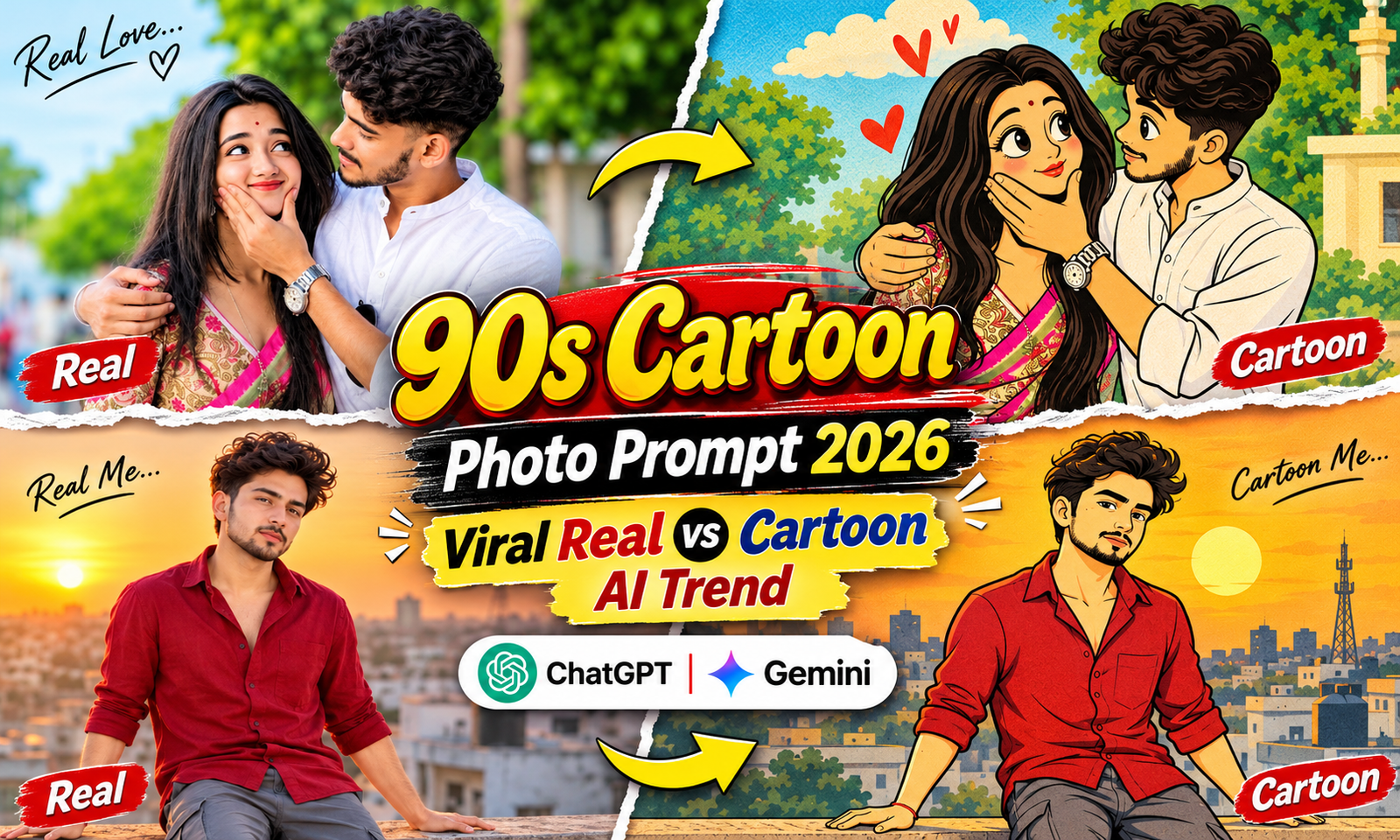
Kya aapne Instagram par aisi photos dekhi hain jisme image ka upper half bilkul real photograph jaisa hota hai aur lower half usi person ka cute vintage cartoon version hota hai? Beech mein ek torn-paper effect hota hai, jo dono styles ko ek creative collage mein connect karta hai.
Yeh 90s Cartoon Photo Prompt trend social media par ek interesting AI photo editing idea ban raha hai. Is style mein aap apni normal selfie ko ek retro cartoon artwork mein transform kar sakte hain, bina manually drawing ya graphic designing kiye.
Is trend ki sabse interesting baat yeh hai ki upper aur lower half mein same person, same outfit aur same background maintain kiya jata hai. Bas photography style cartoon illustration mein change ho jati hai.
Agar aap bhi apni photo ka real-versus-cartoon version banana chahte hain, toh is article mein aapko boys, girls aur couples ke liye 10 original copy-paste prompts milenge. Saath hi ChatGPT aur Google Gemini mein use karne ka complete tutorial bhi milega.
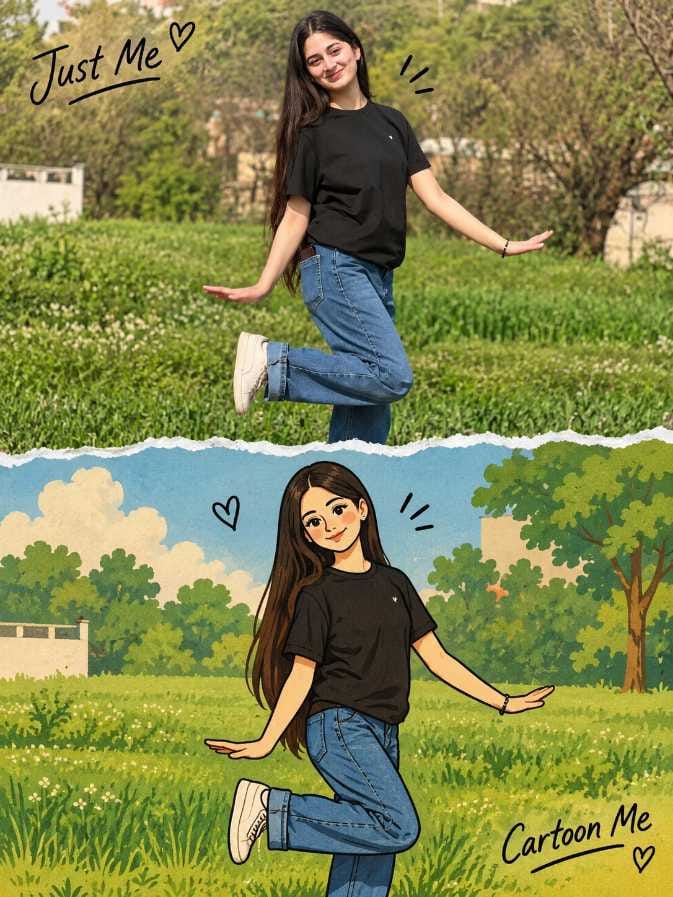
High-end aesthetic Instagram collage, vertical 3:4. TOP 50%: photorealistic [LIGHT / MOOD] portrait of [MODEL] wearing [OUTFIT] in [PLACE], [POSE], [CALM EXPRESSION], warm film tones, editorial, Pinterest-worthy. Short handwritten black pen caption in the upper-left: “[TOP LINE]”. A horizontal torn paper edge with soft white fibrous fringe cuts across the middle. BOTTOM 50%: the exact same scene with the same framing, composition, pose, outfit colours and props, but the entire panel is fully redrawn as an original 1940s hand-painted cartoon — the person becomes a cartoon character with bold black ink outlines, flat gouache colours, bouncy rubber- hose limbs, bare cartoon hands, and the background becomes a painted vintage cartoon version of the same place. No photographic elements in the bottom panel. Cartoon reaction: [CARTOON REACTION]. Short handwritten black pen caption in the bottom-right: “[BOTTOM LINE]”. Clean, editorial, generous negative space. No white gloves, no existing cartoon characters, no mouse ears, no logos, no extra text, no split-screen, no half-real half-cartoon mix.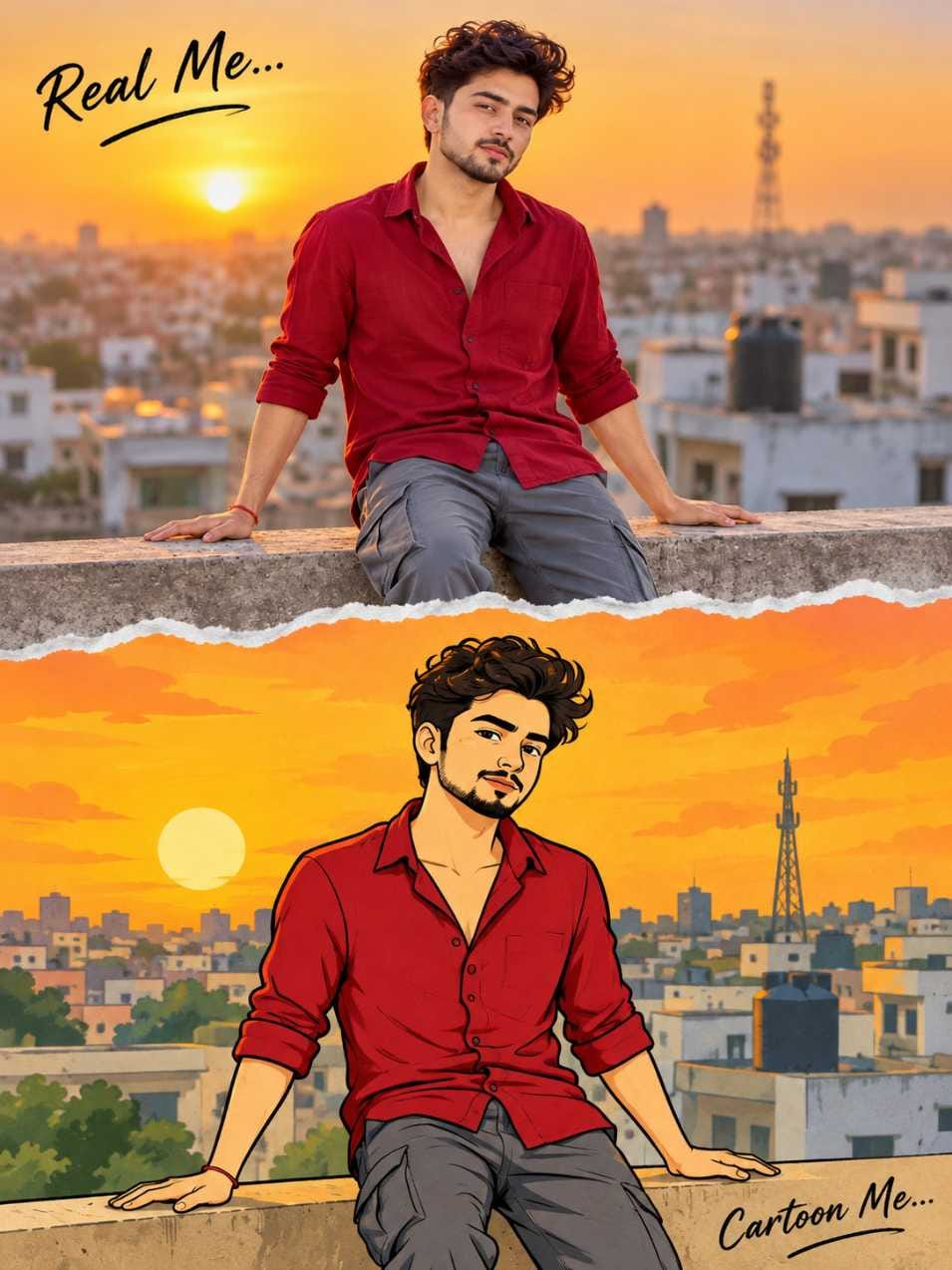
High-end aesthetic Instagram collage, vertical 3:4. TOP 50%: photorealistic [LIGHT / MOOD] portrait of [MODEL] wearing [OUTFIT] in [PLACE], [POSE], [CALM EXPRESSION], warm film tones, editorial, Pinterest-worthy. Short handwritten black pen caption in the upper-left: “[TOP LINE]”. A horizontal torn paper edge with soft white fibrous fringe cuts across the middle. BOTTOM 50%: the exact same scene with the same framing, composition, pose, outfit colours and props, but the entire panel is fully redrawn as an original 1940s hand-painted cartoon — the person becomes a cartoon character with bold black ink outlines, flat gouache colours, bouncy rubber- hose limbs, bare cartoon hands, and the background becomes a painted vintage cartoon version of the same place. No photographic elements in the bottom panel. Cartoon reaction: [CARTOON REACTION]. Short handwritten black pen caption in the bottom-right: “[BOTTOM LINE]”. Clean, editorial, generous negative space. No white gloves, no existing cartoon characters, no mouse ears, no logos, no extra text, no split-screen, no half-real half-cartoon mix.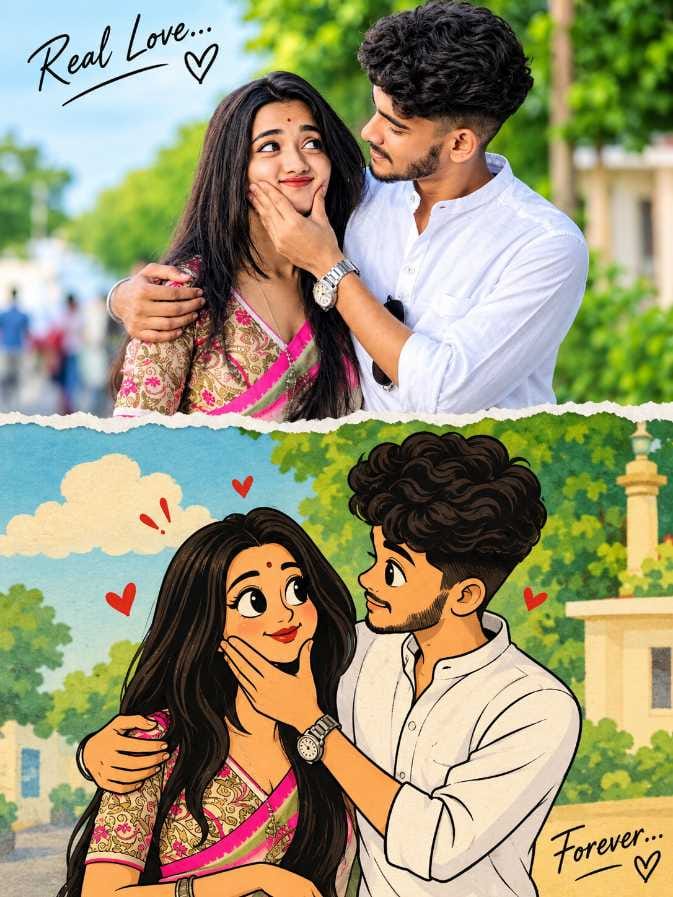
High-end aesthetic Instagram collage, vertical 3:4. TOP 50%: photorealistic [LIGHT / MOOD] portrait of [MODEL] wearing [OUTFIT] in [PLACE], [POSE], [CALM EXPRESSION], warm film tones, editorial, Pinterest-worthy. Short handwritten black pen caption in the upper-left: “[TOP LINE]”. A horizontal torn paper edge with soft white fibrous fringe cuts across the middle. BOTTOM 50%: the exact same scene with the same framing, composition, pose, outfit colours and props, but the entire panel is fully redrawn as an original 1940s hand-painted cartoon — the person becomes a cartoon character with bold black ink outlines, flat gouache colours, bouncy rubber- hose limbs, bare cartoon hands, and the background becomes a painted vintage cartoon version of the same place. No photographic elements in the bottom panel. Cartoon reaction: [CARTOON REACTION]. Short handwritten black pen caption in the bottom-right: “[BOTTOM LINE]”. Clean, editorial, generous negative space. No white gloves, no existing cartoon characters, no mouse ears, no logos, no extra text, no split-screen, no half-real half-cartoon mix.What Is 90s Cartoon Photo Prompt?
90s Cartoon Photo Prompt ek AI image-generation instruction hai jo ek single photograph ko two-part creative collage mein convert karne ke liye use hota hai.
Is design mein image ke do sections hote hain:
- Top Half – Real Photo: Image ka upper section original photorealistic style mein hota hai, jisme aapka face, outfit, pose aur background natural dikhte hain.
- Bottom Half – Cartoon Version: Lower section mein same scene ko vintage hand-painted cartoon illustration ke roop mein recreate kiya jata hai.
Dono sections ke beech ek horizontal torn-paper edge hota hai, jo image ko scrapbook-style aesthetic deta hai.
Vintage cartoon effect mein bold black outlines, flat colours, hand-painted textures aur expressive cartoon features use kiye ja sakte hain.
Is 90s Cartoon Photo Prompt ka use boys, girls, couples aur friends sab kar sakte hain.
Best AI Tools for 90s Cartoon Photo Editing
Aap apni real-versus-cartoon image create karne ke liye ye AI tools try kar sakte hain.
1. ChatGPT
ChatGPT mein apni photograph upload karein aur selected 90s Cartoon Photo Prompt paste karein. Prompt mein upper half ko realistic aur lower half ko vintage cartoon banane ki instructions hoti hain.
Website: https://chatgpt.com/
2. Google Gemini
Google Gemini mein bhi aap apni reference photo upload karke cartoon collage generate karne ki request kar sakte hain.
Website: https://gemini.google.com/
Dono tools ka output different ho sakta hai. Isliye aap same reference photo ke saath dono platforms par experiment kar sakte hain.
10 Best 90s Cartoon Photo Prompts 2026 – Copy and Paste
Neeche diye gaye prompts original creative concepts hain. Har prompt ko copy karein, apni reference photo upload karein aur AI image generator mein paste karein.
How to Use 90s Cartoon Photo Prompt in ChatGPT?
Ab aapke paas 10 different cartoon collage prompts ready hain. Inhe ChatGPT mein use karne ke liye ye steps follow karein.
Step 1: Open ChatGPT
Sabse pehle ChatGPT website ya mobile application open karein.
Apne account mein sign in karein.
Step 2: Upload Your Original Photo
Message box mein attachment option select karein aur apni clear photograph upload karein.
Agar aap couple cartoon banana chahte hain, toh ek aisi photo use karein jisme dono logon ke faces clearly visible hon.
Step 3: Copy the 90s Cartoon Photo Prompt
Is article mein diye gaye prompts mein se apna favourite style choose karein.
Aap classic real-versus-cartoon, boys, girls, couple ya friends wala prompt select kar sakte hain.
Step 4: Paste the Prompt
Selected 90s Cartoon Photo Prompt ko ChatGPT message box mein paste karein.
Prompt mein upper half, torn-paper divider aur lower cartoon half ki instructions already included hain.
Step 5: Generate Your Cartoon Image
Ab Send button par click karein aur image generation complete hone ka wait karein.
Step 6: Make Small Corrections
Agar cartoon half mein face, outfit ya background match nahi kar raha hai, toh simple correction instructions dein.
Example:
- Make the cartoon face more similar to my original photo.
- Keep the same outfit in both halves.
- Make the torn-paper edge more realistic.
- Use softer vintage cartoon colours.
- Keep the background composition exactly the same.
Step 7: Save and Share
Final image pasand aane ke baad save karein aur Instagram, Facebook ya WhatsApp par share karein.
How to Create 90s Cartoon Photo Using Google Gemini?
Aap Google Gemini mein bhi same cartoon prompt try kar sakte hain.
- Google Gemini open karein: https://gemini.google.com/
- Apne Google account se sign in karein.
- Image upload option select karein.
- Apni clear reference photo upload karein.
- Is article se favourite 90s Cartoon Photo Prompt copy karein.
- Prompt ko message box mein paste karein.
- Generate option select karein.
- Image ka upper aur lower half check karein.
- Zaroorat ke according corrections dein.
- Final cartoon collage save kar lein.
Gemini ka interface aur image generation availability account aur current features ke according vary kar sakti hai.
Best Settings for 90s Cartoon Photo Editing
| Setting | Recommended Choice |
|---|---|
| AI Tool | ChatGPT / Gemini |
| Reference Photo | Clear original photograph |
| Aspect Ratio | Vertical 3:4 |
| Top Section | Photorealistic |
| Bottom Section | Vintage hand-painted cartoon |
| Divider | Torn white paper |
| Cartoon Style | Bold black outlines |
| Colour Palette | Soft, warm, flat colours |
| Captions | Short handwritten text |
Vertical 3:4 composition is trend ke liye useful hai, kyunki ismein dono halves ko sufficient space milta hai.
Tips for Better 90s Cartoon Photo Results
Aapka 90s Cartoon Photo Prompt achha result de, iske liye ye tips follow karein.
1. Use a Clear Original Photograph
Aisi photo upload karein jisme face clearly visible ho. Blurry, dark ya heavily filtered photos avoid karein.
2. Maintain the Same Pose
Is trend ka main attraction yahi hai ki real aur cartoon versions mein pose same rahe. Prompt mein same framing aur body position maintain karne ki instruction zaroor rakhein.
3. Keep the Outfit Consistent
Upper half mein jo outfit hai, cartoon half mein bhi wahi colours aur design maintain hone chahiye.
4. Use a Proper Torn-Paper Effect
Torn-paper divider ko horizontal aur slightly uneven rakhein. Isse collage ka scrapbook look better ho sakta hai.
5. Choose Vintage Cartoon Colours
Soft yellow, warm orange, pastel pink, sky blue aur muted green jaise colours vintage illustration ko attractive bana sakte hain.
6. Avoid Existing Cartoon Characters
Apne cartoon character ko original rakhein. Famous cartoon characters, logos ya copyrighted mascots ko copy karne ki instruction na dein.
7. Check Both Halves Before Saving
Final image mein face, outfit, pose aur background dono sections mein match hone chahiye. Agar difference ho, toh AI se correction request karein.
Common Mistakes to Avoid
Low-Quality Photo: Blurry reference image se cartoon face different ho sakta hai.
Different Poses: Agar AI cartoon half mein pose change kar de, toh real-versus-cartoon effect weak ho jata hai.
Wrong Outfit Colours: Upper aur lower sections mein outfit ke colours match hone chahiye.
Missing Torn-Paper Divider: Torn-paper effect is collage ka important visual element hai.
Too Much Text: Extra captions aur random words image ko cluttered bana sakte hain.
Unclear Cartoon Style: Prompt mein vintage hand-painted cartoon, bold outlines aur flat colours clearly mention karein.
Why Is the 90s Cartoon Photo Trend Popular?
Is trend ki popularity ka ek reason iska simple but creative concept hai. Ek hi photograph ke through aap apne real appearance aur cartoon version ko side-by-side nahi, balki ek unique vertical collage mein show kar sakte hain.
Yeh style different types ke social media content ke liye useful hai:
- Personal Instagram posts.
- Couple memory collages.
- Best-friend pictures.
- Family photo illustrations.
- Travel memory artwork.
- Cute pet photo edits.
- Vintage aesthetic posts.
Isliye 90s Cartoon Photo Prompt beginners aur AI photo editing enthusiasts dono ke liye ek fun creative experiment ho sakta hai.
Frequently Asked Questions (FAQs)
Q1. What Is a 90s Cartoon Photo Prompt?
Yeh ek AI image prompt hai jo photograph ke upper half ko realistic aur lower half ko vintage cartoon illustration mein convert karta hai. Dono halves ke beech torn-paper effect hota hai.
Q2. Can I Use 90s Cartoon Photo Prompt in ChatGPT?
Haan. ChatGPT mein apni photograph upload karein aur ready-to-copy 90s Cartoon Photo Prompt paste karke image generate karne ki request karein.
Q3. Can I Create 90s Cartoon Photos in Gemini?
Haan. Google Gemini mein bhi reference photo upload karke same prompt try kar sakte hain. Result selected image generation model par depend karega.
Q4. Is This Prompt Suitable for Boys and Girls?
Haan. Is article mein boys aur girls dono ke liye separate prompts diye gaye hain. Aap apne outfit aur preferred style ke according prompt choose kar sakte hain.
Q5. Can I Create a Cartoon Couple Photo?
Haan. Ek clear couple photograph upload karein aur couple-specific prompt use karein. Dono faces aur original positions preserve karne ki instructions include karein.
Q6. What Is the Best Aspect Ratio for This Cartoon Collage?
Vertical 3:4 ratio useful hai, kyunki upper aur lower sections ko equal space milta hai. Aap apne social media platform ke according crop bhi kar sakte hain.
Q7. Why Does My Cartoon Face Look Different?
Low-quality reference photos, complex lighting aur AI interpretation ki wajah se face change ho sakta hai. Clear photo use karein aur identity preservation instructions add karein.
Q8. Can I Use These 90s Cartoon Photo Prompts for Free?
Aap prompts ko copy karke try kar sakte hain. ChatGPT aur Gemini ke free access, image generation limits aur features account ke according different ho sakte hain.
Conclusion
Agar aap apni normal photograph ko ek cute vintage cartoon collage mein convert karna chahte hain, toh yeh 90s Cartoon Photo Prompt collection aapke liye useful ho sakta hai.
Is article mein classic real-versus-cartoon, boys, girls, couples, friends, pets aur travel themes ke 10 original prompts diye gaye hain.
Apni favourite photo upload karein, prompt copy karein aur ChatGPT ya Gemini mein generate karein. Upper half mein apni real photograph aur lower half mein apna cartoon version dekhkar ek unique social media post create karein.
One Photo. Two Versions. A Whole Lot of 90s Nostalgia! 🎨