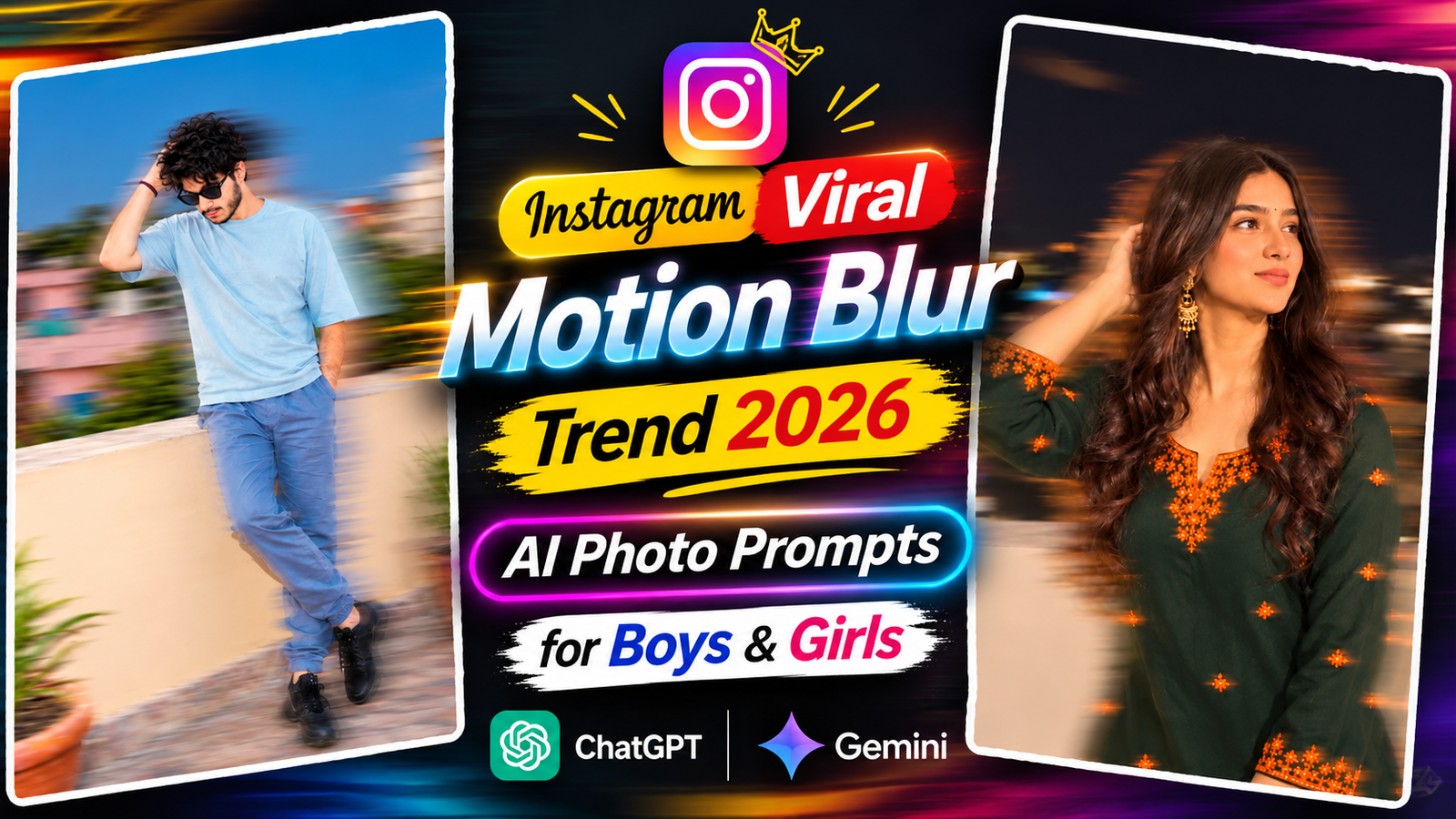
Instagram par ek naya photo editing style kaafi attention attract kar raha hai – Instagram Viral Motion Blur Trend. Is trend mein photograph ka face bilkul sharp aur clear dikhta hai, lekin hair, clothes, hands aur body ke around beautiful motion blur trails create hote hain.
Aisa lagta hai jaise kisi professional photographer ne slow shutter speed aur camera flash ke saath moving subject ki photo capture ki ho.
Sabse interesting baat yeh hai ki aapko expensive DSLR camera ya advanced Photoshop editing skills ki zaroorat nahi hai. Ek clear photograph aur correct AI prompt ki help se aap bhi apni photo ko cinematic motion blur look de sakte hain.
Is article mein aapko Instagram Viral Motion Blur Trend ke liye 10 original copy-paste prompts milenge. Boys, girls, couples aur fashion photography ke different concepts cover kiye gaye hain.
Saath hi aap seekhenge ki Instagram Restyle, ChatGPT aur Google Gemini mein motion blur photo kaise create karni hai.
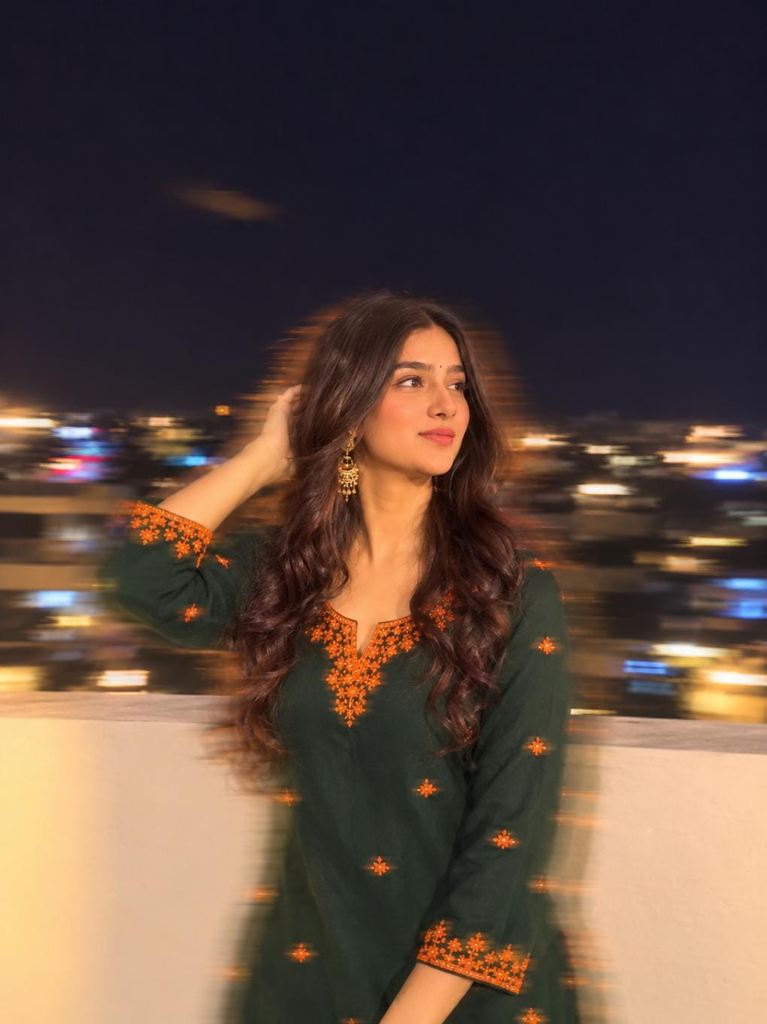
Use the uploaded reference photo for the person’s face and keep their facial identity, skin tone and age exactly. Create a night rooftop portrait with a creative motion blur effect. The person stands at a white rooftop parapet, body slightly turned, looking off to the side with a soft smile, one hand raised to the side of the head, long voluminous wavy brown hair, small bindi and gold chandbali earrings. Outfit: a deep bottle-green kurta with bright orange thread embroidery around the neckline, sleeves and small motifs; for a man, adapt it to a bottle-green kurta with orange embroidery at the collar and cuffs in the same style and colours. Background: a dark navy night sky over a sprawling city with blurred warm and blue lights. Flash on the subject with slow shutter, ghosting and streaks around the body while the face stays sharp, warm skin tones, waist-up framing from eye level, dreamy festive-evening mood. Output must be STRICTLY 3:4 vertical (Instagram post). No text, no watermark, no logos, no extra people, no distorted hands or faces.
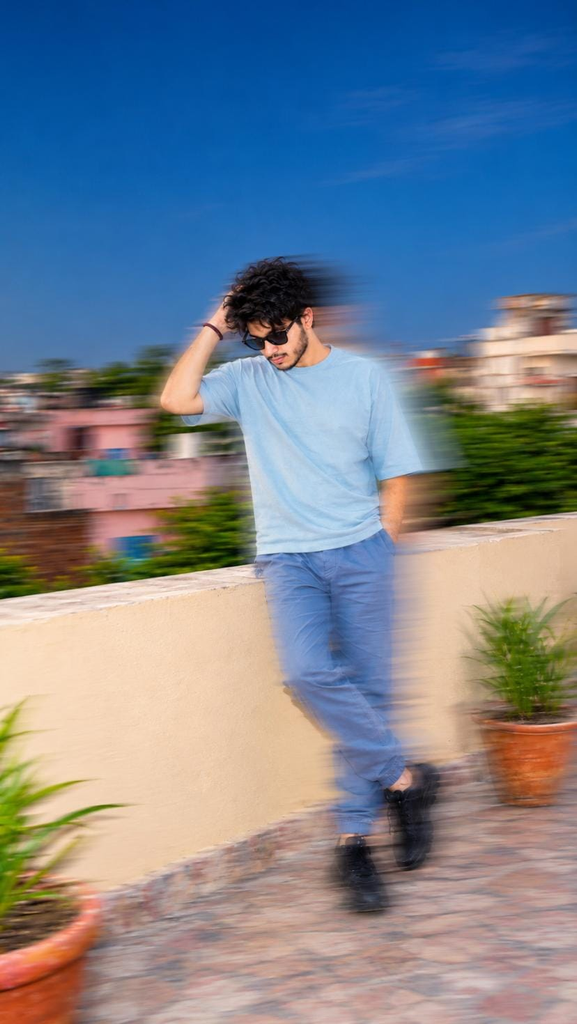
Turn the uploaded photo into a hyper-realistic experimental fashion photograph captured with a slow shutter and direct camera flash. Create strong, dynamic motion trails across the subject’s entire body, hair, sleeves, and clothing, blending sharp flash-lit details with natural directional motion blur. Keep the original face and facial expression
What Is Instagram Viral Motion Blur Trend?
Instagram Viral Motion Blur Trend ek creative AI photo editing style hai jisme still photograph ko moving-camera effect diya jata hai.
Is effect mein person ka face generally sharp rakha jata hai, jabki hair, clothing, arms ya background mein directional blur aur ghosting effects add kiye jaate hain.
Is style ko slow shutter photography se inspiration milti hai. Traditional photography mein slow shutter speed ke through moving objects ke trails capture kiye ja sakte hain. AI tools isi visual effect ko existing photographs mein recreate karne ki koshish karte hain.
Main Features of Motion Blur Photo Editing
- Sharp Face: Person ka face clearly visible rehta hai.
- Moving Hair: Hair ke around natural motion trails create hote hain.
- Clothing Movement: Shirt, kurta, jacket ya dress mein motion effect dikhta hai.
- Slow Shutter Look: Photograph mein cinematic long-exposure feeling aati hai.
- Camera Flash Effect: Subject par bright flash aur background mein darker tones ho sakte hain.
- Ghosting Effect: Body ke edges par subtle movement trails create hote hain.
Isliye Instagram Viral Motion Blur Trend fashion portraits, night photography, street-style pictures aur aesthetic Instagram posts ke liye interesting option hai.
Which AI Tools Support the Motion Blur Trend?
Aap different AI platforms par motion blur photo editing try kar sakte hain.
1. Instagram Restyle
Instagram mein Meta AI-powered Restyle feature available ho sakta hai, jo supported accounts mein Stories ke through photos ko AI style mein transform karne deta hai.
Aap apni photo select karke motion blur effect describe kar sakte hain.
Feature availability account, region aur app version ke according different ho sakti hai.
2. ChatGPT
ChatGPT mein apni original photograph upload karein aur selected motion blur prompt paste karein.
Aap AI ko face sharp rakhne aur hair, clothes ya background mein slow-shutter trails create karne ki instructions de sakte hain.
Website: https://chatgpt.com/
3. Google Gemini
Google Gemini mein bhi apni photo upload karke cinematic motion blur effect generate karne ki request kar sakte hain.
Website: https://gemini.google.com/
Tip: Same prompt different AI tools par different results de sakta hai. Aap multiple attempts try karke best image select kar sakte hain.
How to Use Instagram Viral Motion Blur Trend in Instagram?
Agar aapke Instagram account mein Restyle feature available hai, toh directly Instagram app ke through bhi motion blur effect try kar sakte hain.
Step 1: Instagram App Open Karein
Sabse pehle apne smartphone mein Instagram open karein.
Apne account mein login karein aur app ko latest available version par update rakhein.
Step 2: Create a New Story
Instagram home screen par plus (+) icon tap karein aur Story option select karein.
Step 3: Select Your Photo
Gallery se apni ek clear photograph choose karein.
Aisi image use karein jisme face clearly visible ho aur hair ya clothing mein movement create karne ke liye enough space ho.
Step 4: Find Restyle Option
Agar aapke account mein Restyle feature available hai, toh Story editing screen par Restyle ya AI editing option check karein.
Step 5: Enter Motion Blur Prompt
Photo ko change karne ke liye available prompt box mein motion blur instructions paste karein.
Example:
“Keep my face perfectly sharp and create artistic slow-shutter motion trails around my hair, clothes and body edges. Use direct camera flash and cinematic nighttime lighting.”
Step 6: Generate and Preview
AI result generate hone ke baad face, hands, clothing aur background carefully check karein.
Step 7: Save or Share
Result pasand aane par Done select karein aur available save ya share option use karein.
Important: Instagram Restyle ka interface aur availability sabhi accounts mein same nahi hoti. Agar option nahi mil raha hai, toh ChatGPT ya Gemini mein same prompts try karein. Instagram Reels ke ready-made effects mein custom text prompt ka option zaroori nahi ki available ho.
How to Create Motion Blur Photos Using ChatGPT?
ChatGPT se cinematic motion blur photo banane ke liye ye steps follow karein.
- ChatGPT open karein: https://chatgpt.com/
- Message box mein attachment option select karein.
- Apni clear original photograph upload karein.
- Is article se favourite motion blur prompt copy karein.
- Prompt ko message box mein paste karein.
- Send button par click karein.
- AI-generated image ka preview check karein.
- Zaroorat ke according face aur motion blur corrections request karein.
- Final image save kar lein.
Agar motion blur face ko bhi affect kar raha hai, toh AI ko yeh instruction dein:
“Keep my original face and eyes completely sharp. Apply motion blur only to the hair, clothing edges and background.”
How to Create Motion Blur Photos Using Google Gemini?
Google Gemini mein bhi aap same motion blur prompts use kar sakte hain.
- Google Gemini open karein: https://gemini.google.com/
- Apne Google account se sign in karein.
- Apni original photograph upload karein.
- Selected Instagram Viral Motion Blur Trend prompt paste karein.
- Generate option select karein.
- Result ka preview dekhein.
- Agar face change ho raha hai, toh identity preservation instructions dobara clearly mention karein.
- Final photo save karein.
Gemini ke image generation features aur limits account aur current availability ke according change ho sakte hain.
Best Settings for Instagram Viral Motion Blur Trend
Better results ke liye ye recommended settings try karein.
| Setting | Recommended Choice |
|---|---|
| Reference Photo | Clear, bright photograph |
| Face | Sharp and natural |
| Blur Area | Hair, clothes and body edges |
| Blur Strength | Medium |
| Lighting | Camera flash or warm evening light |
| Pose | Walking, side look or hand in hair |
| Background | Rooftop, street or city lights |
| Instagram Post | 3:4 vertical |
| Instagram Story | 9:16 vertical |
Medium motion blur generally natural-looking results ke liye useful hota hai. Strong blur fashion-editorial effect ke liye try kar sakte hain.
Tips for Better Motion Blur AI Photo Editing
Aapka Instagram Viral Motion Blur Trend result attractive banane ke liye kuch important tips follow karein.
1. Choose a Clear Photo
Aisi photograph select karein jisme face clearly visible ho. Dark, low-resolution aur heavily filtered photos avoid karein.
2. Keep the Face Sharp
Motion blur ka main attraction face aur eyes ko clear rakhna hai. Prompt mein sharp-face instruction zaroor include karein.
3. Select a Natural Pose
Walking, side-looking, hair-adjusting ya turning pose movement effect ke saath achhe lag sakte hain.
4. Use Suitable Backgrounds
City lights, rooftops, rainy streets aur evening locations motion blur effect ko cinematic look de sakte hain.
5. Don’t Overuse Blur
Bahut strong blur se face aur outfit details distort ho sakte hain. Pehle medium strength try karein.
6. Experiment with Different Prompts
Same reference photo ke saath different lighting aur background concepts try karein. Har attempt mein AI ka result different ho sakta hai.
7. Check Hands and Clothing
Image share karne se pehle hands, fingers, outfit details aur body proportions zoom karke check karein.
Common Mistakes in Motion Blur Photo Editing
Face Blurry Ho Jana: Prompt mein face aur eyes sharp rakhne ki instruction add karein.
Too Much Motion Blur: Blur strength reduce karein aur sirf selected areas mein movement effect rakhein.
Distorted Hands: Final image check karein aur hands ko naturally positioned rakhne ki correction request karein.
Background Too Messy: Ek simple rooftop, street ya studio background choose karein.
Wrong Aspect Ratio: Instagram feed ke liye 3:4 aur Stories ke liye 9:16 composition try karein.
Original Face Change Hona: Clear reference image use karein aur identity preservation instruction repeat karein.
Why Is the Instagram Viral Motion Blur Trend Popular?
Is trend ki popularity ka main reason iska cinematic look hai. Normal photograph mein movement add hone se image zyada dynamic aur expressive lagti hai.
Aap is style ko different types ke content mein use kar sakte hain:
- Fashion photography.
- Night rooftop portraits.
- Street-style pictures.
- Traditional festive photos.
- Romantic couple portraits.
- Instagram profile pictures.
- Birthday and celebration posts.
Ek simple photograph se different cinematic looks create karna bhi is trend ko interesting banata hai.
Frequently Asked Questions (FAQs)
Q1. What Is Instagram Viral Motion Blur Trend?
Yeh ek AI photo editing style hai jisme face sharp rakha jata hai aur hair, clothing, body edges ya background mein slow-shutter motion blur effects create kiye jaate hain.
Q2. How Can I Create the Instagram Motion Blur Trend?
Apni clear photograph upload karein aur ChatGPT, Google Gemini ya supported Instagram Restyle feature mein motion blur prompt use karein.
Q3. Which AI Is Best for Motion Blur Photo Editing?
ChatGPT aur Google Gemini dono try kiye ja sakte hain. Instagram Restyle bhi supported accounts mein ek option ho sakta hai. Result selected tool aur prompt par depend karta hai.
Q4. Can Boys and Girls Both Use Motion Blur Prompts?
Haan. Is article mein boys, girls aur couples ke liye different motion blur photography concepts diye gaye hain.
Q5. How Can I Keep My Face Sharp in Motion Blur Photos?
Prompt mein clearly mention karein ki face aur eyes completely sharp rahen aur blur sirf hair, clothes, body edges aur background par apply ho.
Q6. What Is the Best Photo Ratio for Instagram Motion Blur Trend?
Instagram feed ke liye 3:4 vertical composition aur Stories ke liye 9:16 vertical format useful ho sakta hai.
Q7. Why Does My AI Motion Blur Photo Look Distorted?
Strong blur, low-quality reference photos aur complex poses ki wajah se distortion aa sakta hai. Clear image use karein aur blur strength medium rakhein.
Q8. Is Instagram Restyle Available for Everyone?
Feature availability account, region aur app version ke according different ho sakti hai. Agar Restyle option available nahi hai, toh ChatGPT ya Gemini try kar sakte hain.
Q9. Can I Use These Motion Blur Prompts for Free?
Aap prompts ko copy karke try kar sakte hain. Lekin AI tools ki free image generation limits, features aur account requirements alag ho sakti hain.
Conclusion
Agar aap apni normal photograph ko ek cinematic fashion portrait mein convert karna chahte hain, toh Instagram Viral Motion Blur Trend try kar sakte hain.
Is article mein rooftop, street fashion, rainy night, traditional outfit, luxury elevator aur romantic couple photography ke 10 original prompts diye gaye hain.
Apni clear photograph upload karein, favourite prompt copy karein aur ChatGPT ya Gemini mein generate karein. Face sharp rakhein, motion blur ko natural banayein aur final image ko Instagram par share karein.
One Photo, A Little Motion, A Cinematic New Look! 📸