 Sandip Barman
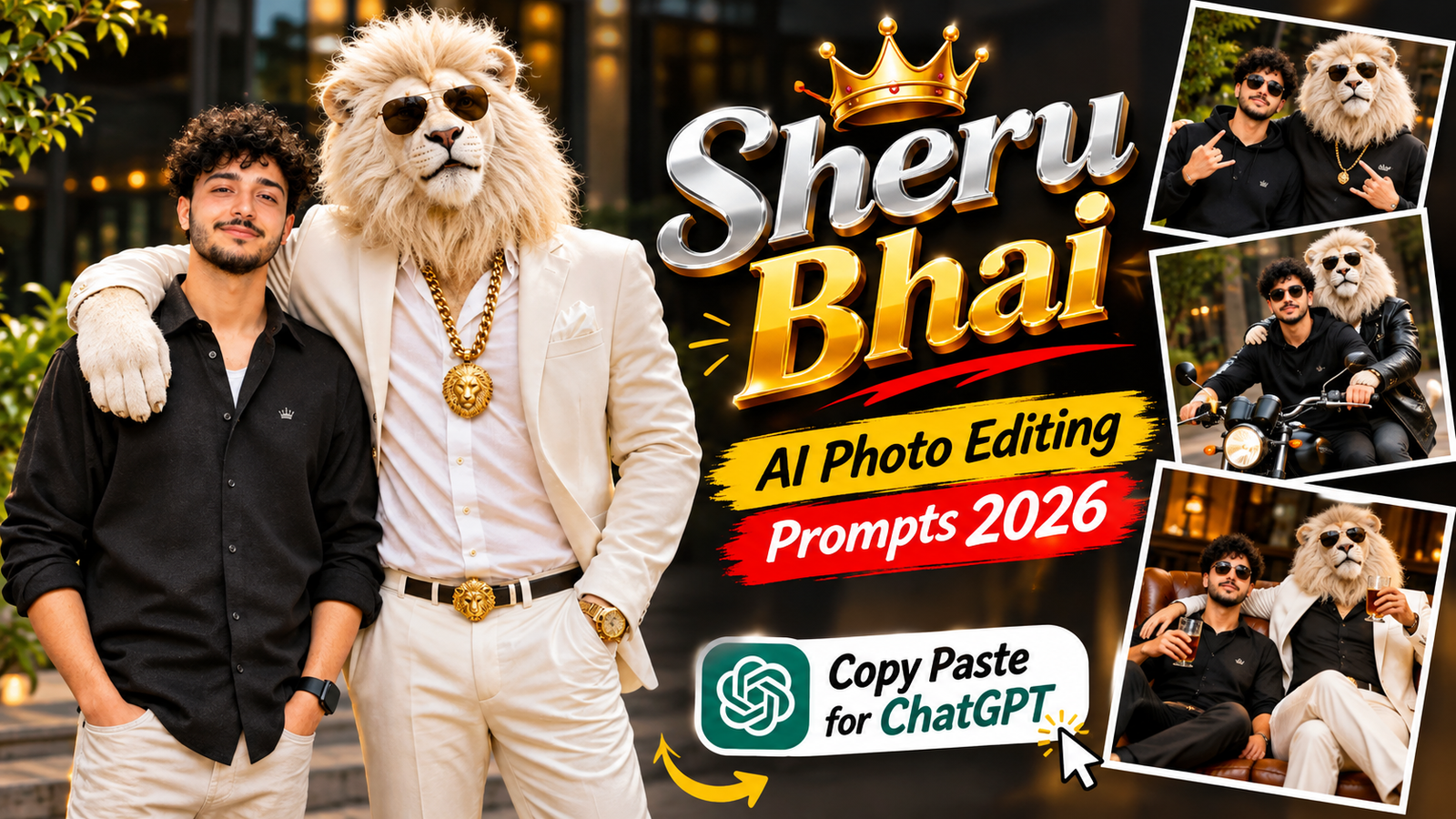
Have you seen the trending Sheru Bhai AI photos on Instagram and YouTube? This entertaining AI photo trend features a powerful lion character with a luxurious mane, stylish sunglasses, a premium suit and a rich businessman personality.
The best part? You can create your own Sheru Bhai AI photo with ChatGPT or Google Gemini by using a detailed image-generation prompt. You can appear beside Sheru Bhai like best friends, business partners or two VIP personalities.
Join Our Channels
Get the latest AI prompts, creative ideas and updates directly on your favourite app.
In this article, you will find the Sheru Bhai AI Photo Editing Prompt collection for 2026. These ready-to-copy prompts feature luxury cars, royal palaces, expensive showrooms, stylish outfits and cinematic photography.
Simply upload your original photograph, copy your favourite Sheru Bhai AI Photo Editing Prompt and generate your own creative image.
What Is the Sheru Bhai AI Photo Editing Trend?
Sheru Bhai is a fictional anthropomorphic lion character created for entertaining AI-generated photos and videos. His signature appearance includes golden-orange fur, a thick luxurious mane, expressive eyes, black sunglasses and a premium formal suit.
In the Sheru Bhai AI photo trend, the lion is often presented as a wealthy businessman surrounded by luxury cars, expensive interiors and royal locations.
You can also create an image of yourself standing beside Sheru Bhai. The AI can use your uploaded photograph as a reference to create a cinematic friendship or business-partner portrait.
Copy the following prompt and paste it into ChatGPT along with your photo.

✦ AI PROMPT
Create an ultra-realistic cinematic DSLR photograph of me standing beside a majestic white lion-headed humanoid character. MY LOOK: Preserve my original face, facial features, hairstyle, skin tone and identity 100%. I am wearing an elegant premium black dress, stylish heels, delicate golden jewellery, a beautiful handbag and a luxury wristwatch. Give me a natural, charming smile with elegant styling. WHITE LION: A tall, majestic humanoid white lion with extremely realistic white furry face, a royal personality, stylish black sunglasses, premium white formal suit, white shirt, heavy golden chain, golden wristwatch and luxury golden accessories. POSE: The lion stands beside me with one arm naturally placed around my shoulder like my best friend. I stand confidently beside the lion, smiling naturally at the camera. LOCATION: Luxury modern hotel entrance with beautiful glass architecture, decorative greenery and warm cinematic lighting. PHOTOGRAPHY: Professional DSLR photography, realistic skin texture, detailed white lion fur, cinematic depth of field, natural shadows, sharp facial details, premium color grading, ultra-HD 8K quality. STRICT IDENTITY LOCK: Use my uploaded reference photo and preserve my original identity 100%. Do not modify, replace or reshape my facial features. Make it look like a genuine professional photograph, not an AI-generated image. Aspect ratio: 4:5.
✦ AI PROMPT
Create an ultra-realistic cinematic 8K DSLR full-body portrait using my uploaded photo as the STRICT FACE AND OUTFIT REFERENCE. Preserve my exact original facial identity, face shape, skin tone, curly black hairstyle, eyes, eyebrows, nose, lips, teeth, moustache, beard, natural smile and body proportions with 100% accuracy. Keep my original black, white and grey checked shirt EXACTLY the same, including its pattern, colours, collar, buttons, sleeves and fit. Do not change my clothing or accessories. Show me standing confidently beside a majestic, giant, ultra-realistic white lion with a thick cream-white mane. The lion stands on my left side with one front paw naturally resting on my shoulder. The lion wears a premium white royal formal suit, heavy golden chain, golden wristwatch, golden pocket square and stylish black sunglasses. Both face the camera with confident expressions. Place us at a luxurious royal palace entrance featuring elegant cream marble pillars, beautiful architecture and soft green plants. Professional cinematic photography, 85mm DSLR lens, f/1.8, natural lighting, realistic shadows, sharp facial details, detailed fur texture, realistic anatomy, premium Instagram photography, cinematic colour grading and beautiful depth of field. ABSOLUTE PRIORITY: My original face and checked shirt must remain unchanged. Only add the white lion and replace the background. Do not generate a different face, hairstyle or outfit. No text, no logos, no watermark. Vertical 4:5 composition, ultra-realistic 8K quality.
✦ AI PROMPT
Create an ultra-realistic cinematic DSLR photograph of me standing beside a majestic white lion-headed humanoid character. **MY LOOK:** Preserve my original face, facial features, hairstyle, skin tone and identity 100%. I am wearing a premium black oversized shirt, beige trousers, stylish sneakers and a luxury wristwatch. Give me a natural, confident smile. **WHITE LION:** A tall, muscular humanoid white lion with extremely realistic white fur, a royal personality, stylish black sunglasses, premium white formal suit, white shirt, heavy golden chain, golden wristwatch and luxury golden accessories. **POSE:** The lion stands beside me with one arm naturally placed around my shoulder like my best friend. Both of us are looking directly at the camera with confident expressions. **LOCATION:** Luxury modern hotel entrance with beautiful glass architecture, greenery and warm cinematic lighting. **PHOTOGRAPHY:** Professional DSLR photography, realistic skin texture, detailed lion fur, cinematic depth of field, natural shadows, sharp focus, premium color grading, ultra-HD 8K quality. STRICT IDENTITY LOCK: Use my uploaded reference photo and preserve my original identity without changing or replacing my face. Make it look like a genuine professional photograph, not an AI-generated image. Aspect ratio: 4:5.
✦ AI PROMPT
Create an ultra-realistic cinematic 8K DSLR full-body portrait of me standing beside a majestic, giant, ultra-realistic white lion with a thick, luxurious cream-white mane. Use my uploaded photo as the STRICT FACE, IDENTITY AND OUTFIT REFERENCE. Preserve my exact original female facial identity, face shape, skin tone, hairstyle, hair colour, eyes, eyebrows, nose, lips, teeth, natural smile and body proportions with 100% accuracy. Keep my original outfit EXACTLY the same as in the uploaded photo, including its colours, pattern, design, fabric, neckline, sleeves, fitting and accessories. Do not change, replace or redesign my face, hairstyle, body or clothing. The majestic white lion stands on my left side with one front paw naturally resting gently on my shoulder. The lion wears a premium white royal formal suit, heavy golden chain, luxurious golden wristwatch, golden pocket square and stylish black sunglasses. Both of us face the camera with confident, natural expressions. Place us at a luxurious royal palace entrance featuring elegant cream marble pillars, beautiful royal architecture and soft green plants. Professional cinematic photography, 85mm DSLR lens, f/1.8 aperture, natural lighting, realistic shadows, extremely sharp facial details, detailed realistic white fur, anatomically accurate bodies, premium Instagram photography, cinematic colour grading and beautiful depth of field. ABSOLUTE PRIORITY: My original face, hairstyle, skin tone and outfit must remain 100% unchanged. Only add the white lion and replace the background. No text, no logos, no watermark. Vertical 4:5 composition, ultra-realistic 8K quality.How to Create a Sheru Bhai AI Photo Using ChatGPT
Follow these steps to generate your Sheru Bhai AI photo using ChatGPT:
- Open ChatGPT and access its image-generation feature.
- Upload a clear photograph of yourself.
- Choose any Sheru Bhai AI Photo Editing Prompt from this article.
- Copy the complete prompt and paste it into ChatGPT.
- Generate your image.
- If your face or outfit changes, ask the AI to correct the image using your original reference photograph.
For a better result, use a clear front-facing photograph with good lighting.
How to Create a Sheru Bhai AI Photo Using Google Gemini
You can also experiment with Google Gemini to create a Sheru Bhai AI photo.
- Open Google Gemini.
- Upload your original photograph.
- Copy your favourite Sheru Bhai AI Photo Editing Prompt.
- Paste the prompt into the chat.
- Generate the image and review the result.
- If necessary, request corrections to your face, outfit or background.
AI tools may interpret prompts differently, so you might need a few attempts to achieve your preferred result.
Tips for Better Sheru Bhai AI Photos
- Use a high-quality reference photograph with a clearly visible face.
- Include detailed instructions about Sheru Bhai’s golden mane, suit and accessories.
- Specify the lion’s position relative to you.
- Keep the original outfit if you want an authentic photo-editing result.
- Mention realistic anatomy and natural shadows.
- Try different luxury backgrounds to create multiple versions.
- Use a 4:5 vertical composition for Instagram feed posts.
Frequently Asked Questions
1. What is Sheru Bhai AI Photo Editing Prompt?
It is a text instruction used with an AI image generator to create a fictional golden lion businessman character, often standing beside a person in a cinematic luxury setting.
2. Can I create Sheru Bhai photos using ChatGPT?
Yes. You can upload your photograph and use a Sheru Bhai AI Photo Editing Prompt with ChatGPT’s image-generation feature, if available.
3. Can I use Sheru Bhai prompts in Google Gemini?
Yes. You can upload a reference photograph and paste a detailed prompt into Gemini’s image-generation experience.
4. How can I keep my original face in Sheru Bhai AI photos?
Use a clear reference photo and include strict identity-preservation instructions. However, AI image generators may still make small changes, so review the final image carefully.
5. Can I change Sheru Bhai’s outfit and background?
Yes. You can customise the lion’s suit, accessories, pose, location and background according to your preferred style.
6. What is the best Instagram size for Sheru Bhai photos?
A vertical 4:5 composition is a good choice for Instagram feed portraits. You can also generate 9:16 images for Stories and Reels covers.
Final Words
The Sheru Bhai trend is a fun way to experiment with creative AI photography. With these Sheru Bhai AI Photo Editing Prompts, you can create stylish pictures featuring a powerful golden lion businessman, luxury cars, royal palaces and modern business locations.
Choose your favourite prompt, upload your photograph and create your own Sheru Bhai-style Instagram portrait. Experiment with different scenes and poses to make every image unique.